







Regularized Momentum
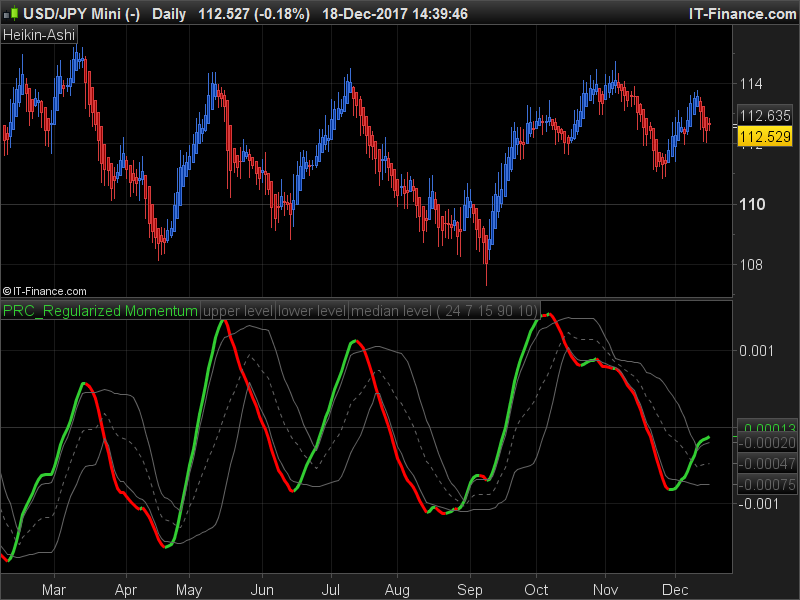
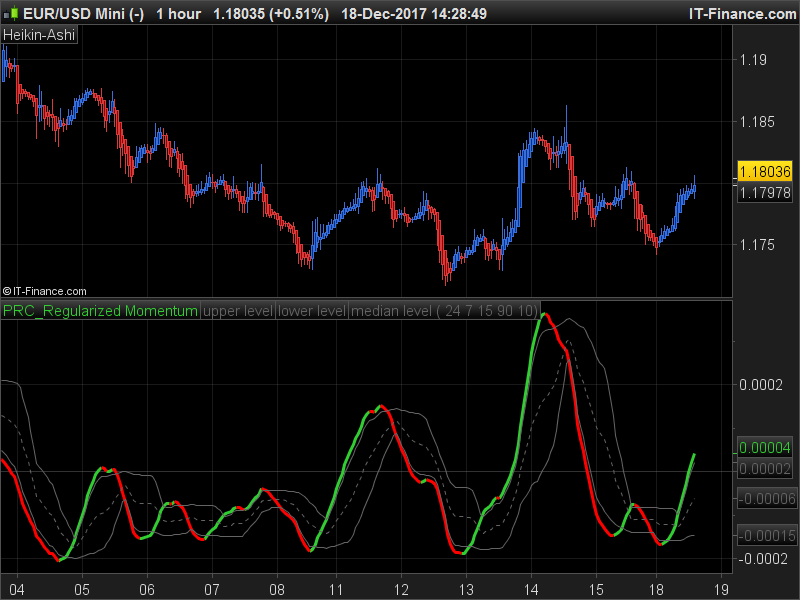
The Regularized Momentum indicator is a classic momentum calculation made with a Regularized Exponential Moving Average (or Regularized EMA) of Heikin Ashi median price (Heikin Ashi High + Heikin Ashi Low) / 2.
It returns a smoothed momentum, and instead of using the 0 line to trigger trend reversals, the indicator has ‘floating levels’ made with recent highest highs and lowest lows of the main oscillator.
The ‘Length’ and ‘Lambda’ settings are adjustable, these parameters smooth more or less the curve.
//PRC_Regularized Momentum | indicator
//18.12.2017
//Nicolas @ www.prorealcode.com
//Sharing ProRealTime knowledge
//Converted from MT4 indicator (mladen)

// --- settings
//Length6=14
//Lambda=7
//MinMaxPeriod=15
//LevelUp=90
//LevelDown=10
// --- end of settings

IF BarIndex=0 THEN
 xClose = (open+high+low+close)/4
 xOpen = open
 xHigh = high
 xLow = low
ELSE
 xClose = (open+high+low+close)/4
 xOpen = (xOpen[1]+xClose[1])/2
 xHigh = Max(max(high, xOpen), xClose)
 xLow = Min(min(Low, xOpen), xClose)
endif

data = (xHigh+xLow)/2

once fctrema6=data
alpha6  = 2.0/(1.0+Length6)
regf1  = (1.0+Lambda*2.0)
regf2  = (1.0+Lambda)

if barindex>length6 then
 fctrema6 = (regf1*fctrema6[1]+alpha6*(data-fctrema6[1])-Lambda*fctrema6[2])/regf2
 mom6 = (fctrema6-fctrema6[1])/fctrema6
endif

r=50
g=205
b=50
if mom6<mom6[1] then
 r=255
 g=0
 b=0
endif

//floating levels
flLookBack      = MinMaxPeriod // Floating levels lookback period
flLevelUp       = LevelUp // Floating levels up level %
flLevelDown     = LevelDown // Floating levels down level %
mini   = lowest[flLookBack](mom6)
maxi   = highest[flLookBack](mom6)
rrange = maxi-mini
flu    = mini+flLevelUp*rrange/100.0
fld    = mini+flLevelDown*rrange/100.0
flm    = mini+0.5*rrange


return mom6 coloured(r,g,b) style(line,3), flu coloured(100,100,100) STYLE(line,1) as "upper level", fld coloured(100,100,100) STYLE(line,1) as "lower level", flm coloured(100,100,100) STYLE(dottedline,1) as "median level"
Comments
You must be logged in to post a comment.


I'm trying to apply the regularization calculation method to another value, which I've found to work great when applied to a chart. However, when I try to apply the indicator to a screener, I receive no results back. Is there anything in the above code that would prevent it from working in a screener or something else that would need to be done to get it to work. Very much appreciated!!!

Bonjour, Warath, je ne sais pas si tu as eu ta réponse ? Je débute aussi mais je pense pouvoir répondre à ta question. Quand tu crées un indicateur, tu fais un copier/coller de l'indicateur, parfois tu as besoin d'entrer des variables en plus, ce qui est le cas ici. Tu vas sur la clef à mollette en haut à gauche, tu cliques dessus et tu renseignes Nom dans le programme, ici : length6, tu ajoutes et tu rentres le settings renseigné par Nicolas dans le code : entier : 14. Tu fais çà pour tous et çà marche, normalement ?!?

Bonjour, tout nouveau sur le forum, j'essai de comprend un minimum la programmation et j'ai voulu essayer votre indicateur qui à l'air très bien, seulement quand je veux le valider la fenêtre erreur de syntaxe ouvre et me demande de définir la variable suivante : length6 / lambda / minmaxperiod / levelup / leveldown. Je me pense que je dois renseigner quelque chose, mais cela m'étonne. pouvez vous m’éclairer. Merci.


Hi, can this code be converted for the Nanotrader Platform or for the MT4 Platform?