PRC williams' high and low indicator

Viewing 15 posts - 1 through 15 (of 25 total)
  • Author
    Posts
  • #70827 quote
    Gianluca
    Participant
    Master

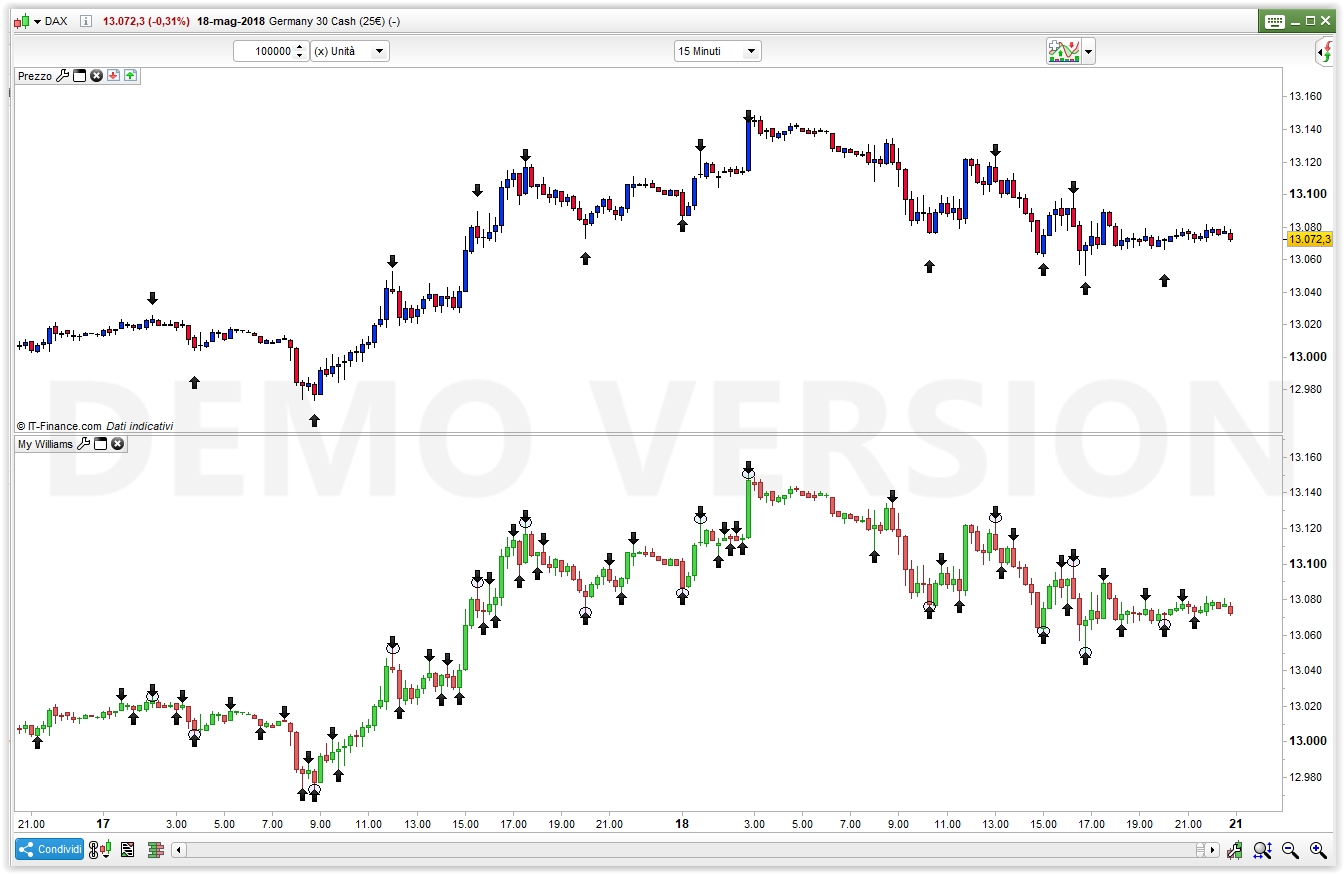
    Hi everyone, i found this indicator on the PRC forum, i see that it have too many false signal, except one, the arrow with the radius one, so i would modify the indicator in order to show that only arrow. Unfortunally i don’t know how to do it. There is someone that could help me? @robertogozzi @nicolas ?[attachment file=70828] like this

    //computation of the radius to draw ellipses
    radius=average[200](range)/4
    //if golong=1 then
    //golong=0
    //endif
    //formula to compute short term swing points
    if (high>alto[1]) and not (high<high[1] and low>low[1]) then
    alto=high
    basso=low
    markup=barindex
    markhigh=high
    endif
    if (low<basso[1]) and not (high<high[1] and low>low[1]) then
    alto=high
    basso=low
    markdown=barindex
    marklow=low
    endif
    
    if alto<alto[1] and trend=1 then
    trend=0
    drawarrowdown(markup,markhigh)
    mediummarkup=shortmarkup
    shortmarkup=markup
    longmarkhigh=mediummarkhigh
    mediummarkhigh=shortmarkhigh
    shortmarkhigh=markhigh
    //intermediate high swing points
    if longmarkhigh<mediummarkhigh and mediummarkhigh>shortmarkhigh then
    DRAWELLIPSE(mediummarkup-1, mediummarkhigh-radius, mediummarkup+1, mediummarkhigh+radius)
    endif
    endif
    
    if basso>basso[1] and trend=0 then
    trend=1
    drawarrowup(markdown,marklow)
    mediummarkdown=shortmarkdown
    shortmarkdown=markdown
    longmarklow=mediummarklow
    mediummarklow=shortmarklow
    shortmarklow=marklow
    //intermediate low swing points
    if longmarklow>mediummarklow and mediummarklow<shortmarklow then
    DRAWELLIPSE(mediummarkdown-1, mediummarklow-radius, mediummarkdown+1, mediummarklow+radius)
    endif
    endif
    
    
    drawcandle(open,high,low,close)
    return
    
    #70832 quote
    robertogozzi
    Moderator
    Master

    It’s a bit easier to select the good ones AFTER they have been displayed. The hardest part is knowing BEFORE how to prevent false future arrows/signals from being shown.

    To know what to do you have to tell us:

    1. instrument used
    2. timeframe used
    3. what makes the black arrows you circled different from the other unmarked ones

    in order to test it and try to make it work as you like (well… don’t take it for granted!).

    #70866 quote
    Gianluca
    Participant
    Master

    It’s a bit easier to select the good ones AFTER they have been displayed. The hardest part is knowing BEFORE how to prevent false future arrows/signals from being shown.

    To know what to do you have to tell us:

    1. instrument used
    2. timeframe used
    3. what makes the black arrows you circled different from the other unmarked ones

    in order to test it and try to make it work as you like (well… don’t take it for granted!).

    That was my request, i don’t know how the Indicator made that circle difference from the other.

    #70882 quote
    robertogozzi
    Moderator
    Master

    Sorry for being so stupid…. I answered you post without even reading the code!!!

    I thought YOU had drawn those circles around some arrows, how silly!!!

    Sorry, again; if (NOW) I correctly understood what you mean that is the code:

    DEFPARAM CalculateOnLastBars = 1000
    //computation of the radius to draw ellipses
    //radius=average[200](range)/4
    //if golong=1 then
    //golong=0
    //endif
    //formula to compute short term swing points
    if (high>alto[1]) and not (high<high[1] and low>low[1]) then
    alto=high
    basso=low
    markup=barindex
    markhigh=high
    endif
    if (low<basso[1]) and not (high<high[1] and low>low[1]) then
    alto=high
    basso=low
    markdown=barindex
    marklow=low
    endif
     
    if alto<alto[1] and trend=1 then
    trend=0
    //drawarrowdown(markup,markhigh)
    mediummarkup=shortmarkup
    shortmarkup=markup
    longmarkhigh=mediummarkhigh
    mediummarkhigh=shortmarkhigh
    shortmarkhigh=markhigh
    //intermediate high swing points
    if longmarkhigh<mediummarkhigh and mediummarkhigh>shortmarkhigh then
    //DRAWELLIPSE(mediummarkup-1, mediummarkhigh-radius, mediummarkup+1, mediummarkhigh+radius)
    drawarrowdown(mediummarkup,markhigh+10)
    endif
    endif
     
    if basso>basso[1] and trend=0 then
    trend=1
    //drawarrowup(markdown,marklow)
    mediummarkdown=shortmarkdown
    shortmarkdown=markdown
    longmarklow=mediummarklow
    mediummarklow=shortmarklow
    shortmarklow=marklow
    //intermediate low swing points
    if longmarklow>mediummarklow and mediummarklow<shortmarklow then
    //DRAWELLIPSE(mediummarkdown-1, mediummarklow-radius, mediummarkdown+1, mediummarklow+radius)
    drawarrowup(mediummarkdown,marklow-20)
    endif
    endif
     
     
    drawcandle(open,high,low,close)
    return

    If you want to put it on the price, rather than below, you may (not mandatory) comment the second last line (DRAWCANDLE).

    The attached pic shows the difference between the two versions.

    #70910 quote
    Gianluca
    Participant
    Master

    Sorry for being so stupid…. I answered you post without even reading the code!!!

    I thought YOU had drawn those circles around some arrows, how silly!!!

    Sorry, again; if (NOW) I correctly understood what you mean that is the code:

    If you want to put it on the price, rather than below, you may (not mandatory) comment the second last line (DRAWCANDLE).

    The attached pic shows the difference between the two versions.

    WONDERFULL!!!!!

    #70959 quote
    Gianluca
    Participant
    Master

    It’s a bit easier to select the good ones AFTER they have been displayed. The hardest part is knowing BEFORE how to prevent false future arrows/signals from being shown.

    To know what to do you have to tell us:

    1. instrument used
    2. timeframe used
    3. what makes the black arrows you circled different from the other unmarked ones

    in order to test it and try to make it work as you like (well… don’t take it for granted!).

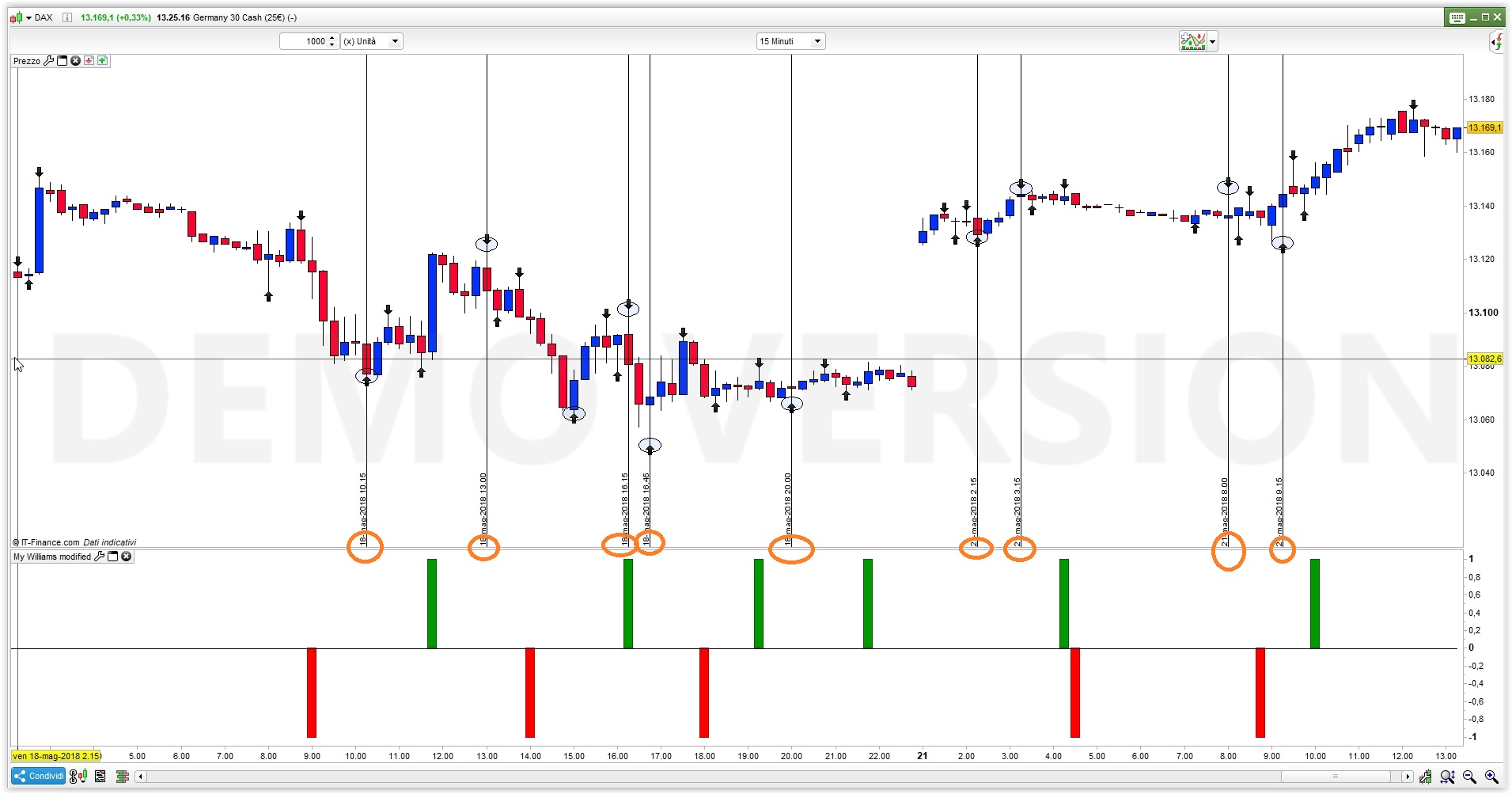
    And would be possible to change that indicator in an Histogram indicator +1 -1 ? like this? [attachment file=70960]

    #70979 quote
    robertogozzi
    Moderator
    Master

    Sorry, but it is not possible, because Arrows are sometimes drawn in the past, while a histogram can only be drawn on the current bar.

    But you can put the indicator below the price, like RSI or MACD and comment out the second last line where you read DRAWCANDLE; it won’t display histograms, but arrows and you can also color them the way you like.

    #70981 quote
    Ste
    Participant
    Master

    Roberto sorry, so isn’t possible to make a simple but/sell strategy when you set arrows? I tried but I was not able..

    #70989 quote
    robertogozzi
    Moderator
    Master

    I am just trying to debug it, I’ll let you know.

    Ste and Gianluca thanked this post
    #70995 quote
    Ste
    Participant
    Master

    maybe this link can help

    williams indicator

    #71002 quote
    robertogozzi
    Moderator
    Master

    The code should be extremely easy to convert to a HISTOGRAM, when it draws an Arrow + Ellipse I can se a value to be returned by the indicator, 1 for Bullish candles and -1 for Bearish candles and I attach te code for those who want to investigate more, but as from attached pic, histogram bars are NOT displayed when ane arrow+ellispe is on the price!

    And I cannot guess why.

    DEFPARAM CalculateOnLastBars = 300
    x = 0
    //computation of the radius to draw ellipses
    radius=average[200](range)/4
    //if golong=1 then
    //golong=0
    //endif
    //formula to compute short term swing points
    if (high>alto[1]) and not (high<high[1] and low>low[1]) then
    alto=high
    basso=low
    markup=barindex
    markhigh=high
    endif
    if (low<basso[1]) and not (high<high[1] and low>low[1]) then
    alto=high
    basso=low
    markdown=barindex
    marklow=low
    endif
     
    if alto<alto[1] and trend=1 then
    trend=0
    drawarrowdown(markup,markhigh)
    mediummarkup=shortmarkup
    shortmarkup=markup
    longmarkhigh=mediummarkhigh
    mediummarkhigh=shortmarkhigh
    shortmarkhigh=markhigh
    //intermediate high swing points
    if longmarkhigh<mediummarkhigh and mediummarkhigh>shortmarkhigh then
    DRAWELLIPSE(mediummarkup-1, mediummarkhigh-radius, mediummarkup+1, mediummarkhigh+radius)
    //drawarrowdown(markup,markhigh)
    x = -1
    endif
    endif
     
    if basso>basso[1] and trend=0 then
    trend=1
    drawarrowup(markdown,marklow)
    mediummarkdown=shortmarkdown
    shortmarkdown=markdown
    longmarklow=mediummarklow
    mediummarklow=shortmarklow
    shortmarklow=marklow
    //intermediate low swing points
    if longmarklow>mediummarklow and mediummarklow<shortmarklow then
    DRAWELLIPSE(mediummarkdown-1, mediummarklow-radius, mediummarkdown+1, mediummarklow+radius)
    //drawarrowup(markdown,marklow)
    x = 1
    endif
    endif
     
     
    //drawcandle(open,high,low,close)
    return x, 0
    #71008 quote
    Gianluca
    Participant
    Master

    The code should be extremely easy to convert to a HISTOGRAM, when it draws an Arrow + Ellipse I can se a value to be returned by the indicator, 1 for Bullish candles and -1 for Bearish candles and I attach te code for those who want to investigate more, but as from attached pic, histogram bars are NOT displayed when ane arrow+ellispe is on the price!

    And I cannot guess why.

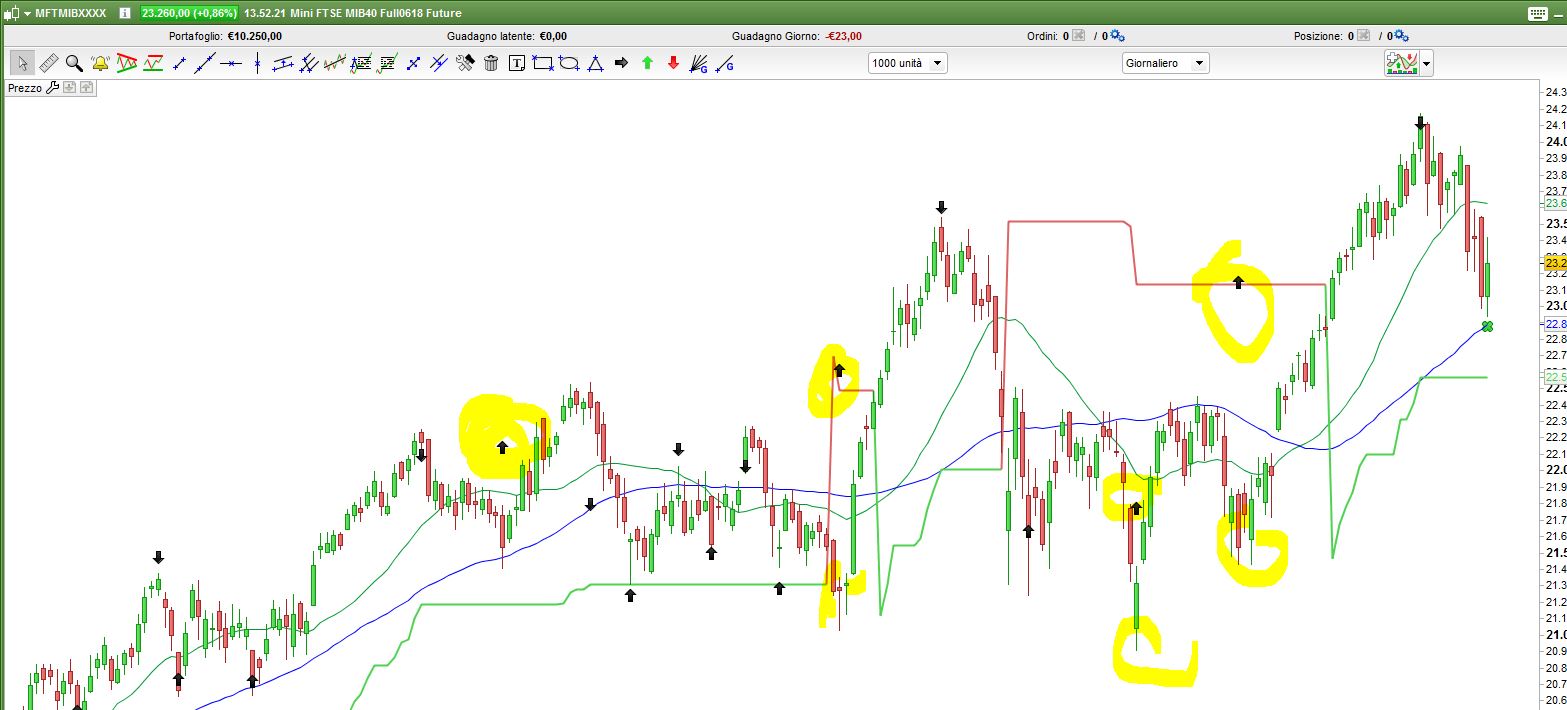
    i know, i had the same problem too, and also there is a graphic bug with your firs modify to the indicator, like here :[attachment file=71009]

    #71011 quote
    Ste
    Participant
    Master

    The same for me, maybe @Nicolas could help us.

    Thanks a lot Roberto.

    #71032 quote
    Gianluca
    Participant
    Master

    I think that we can take out something good from this.

    #71037 quote
    Gianluca
    Participant
    Master

    Sorry for being so stupid…. I answered you post without even reading the code!!!

    I thought YOU had drawn those circles around some arrows, how silly!!!

    Sorry, again; if (NOW) I correctly understood what you mean that is the code:

    @roberto sorry for bother you again… do you think would be possible to make a scanner from this?

Viewing 15 posts - 1 through 15 (of 25 total)
  • You must be logged in to reply to this topic.

PRC williams' high and low indicator


ProBuilder support

New Reply
Author
author-avatar
Gianluca @altares Participant
Summary

This topic contains 24 replies,
has 4 voices, and was last updated by Ste

7 years, 8 months ago.

Topic Details
Forum: ProBuilder support
Language: English
Started: 05/19/2018
Status: Active
Attachments: 6 files
Logo Logo
Loading...