Basic question

Viewing 5 posts - 1 through 5 (of 5 total)

  • Author
    Posts
  • #9444 quote
    verygrubby
    Participant
    Master

    Hello all,

    I’m new to all this, and trying to work out what some of the detail in the auto-generated code means.

    In the section below, what exactly does the “[1]” bit mean at the end? Is it something to do with offsetting candles when deciding when to enter the trade?

    // Conditions to enter long positions
    indicator1 = close
    indicator2 = SAR[0.02,0.02,0.11]
    c1 = (indicator1 CROSSES OVER indicator2[1])


    Much appreciated,

    Grubby

    #9454 quote
    Nicolas
    Keymaster
    Legend

    Hello, yes the number under brackets is the candlestick/period offset in the past.

    #9464 quote
    verygrubby
    Participant
    Master

    Thanks for that. I have another question if you don’t mind   :).

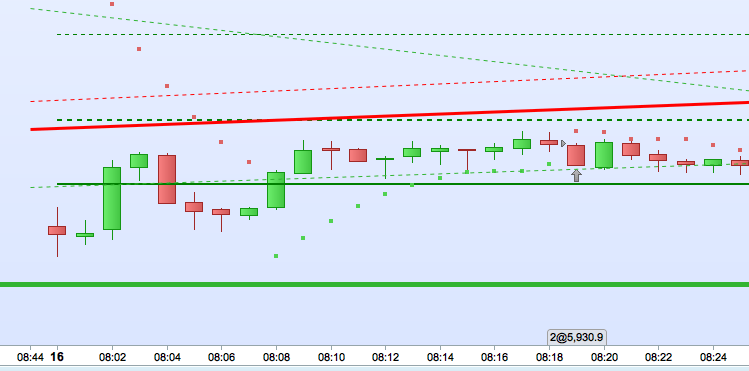
    Im trying to trigger buys/sells when the price moves above/below the parabolic SAR. However, my attempt at the code (e.g. see below) seems to trigger buys at unexpected points – its certainly not doing what I hoped.

    e.g. in the attached screenshot I would have expected a BUY at approx 8.08am (when price moved above the SAR, switching it to green) , and a SELL at approx 8.19am (when the price moved below the SAR, switching it to red)…. but its done something completely different (no BUY at 8.08, but a BUT at 8.19)…

    [attachment file=9465]

    any ideas what i’ve done wrong?


    thanks


    // Conditions to enter long positions
    indicator1 = close
    indicator2 = SAR[0.2,0.2,0.2]
    c1 = (indicator1 CROSSES OVER indicator2[1])

    IF c1 THEN
    BUY 2 PERPOINT AT MARKET
    ENDIF

    Screenshot-2016-06-16-18.18.12.png Screenshot-2016-06-16-18.18.12.png
    #9469 quote
    Adolfo
    Participant
    Senior

    In your first code SAR parameter was (0.02,0.02,0.11), in 2nd post you’ve (0.2,0.2,0,2), is it correct?

    indicator1 = close
    indicator2 = SAR[0.02,0.02,0.11]
    c1 = (indicator1 < indicator2)
    IF c1 THEN
    BUY 2 PERPOINT AT indicator2 STOP
    ENDIF

    This is what I suggest to you, while price is under SAR, you set an STOP order at SAR price in order to be filled is price touch it.

    #9472 quote
    verygrubby
    Participant
    Master

    Thanks Adolfo… i will give that a go

Viewing 5 posts - 1 through 5 (of 5 total)
  • You must be logged in to reply to this topic.
ProRealAI ProRealAI New

Stuck on this ProBuilder code?

Describe what this topic is trying to build, in plain English, and ProRealAI writes the ProRealTime™ indicator, screener or system for you.

Available in 7 languages
Try ProRealAI

Basic question


ProOrder: Automated Strategies & Backtesting

New Reply
Author
author-avatar
verygrubby @verygrubby Participant
Summary

This topic contains 4 replies,
has 3 voices, and was last updated by verygrubby
10 years, 2 months ago.

Topic Details
Forum: ProOrder: Automated Strategies & Backtesting
Language: English
Started: 06/16/2016
Status: Active
Attachments: No files
Logo Logo
Loading...