


Coding Stochastic and MACD rise

Viewing 2 posts - 1 through 2 (of 2 total)

  • Author
    Posts
  • #203589 quote
    cyrillic
    Participant
    Junior

    Hi
    I am new to programming .
    Re the Stochastic
    I understand about %K passing below %D but if my program starts at 0800 and the crossover happened at 0750, how do I code the rising stochastic
    Can I code the %D line like the moving average ?

    Similarly with the MACD, can I code the signal line ?
    Also with the command
    IF ……. Then,
    IF …..
    what exactly does “then” mean, does it mean wait until the second command completes or a number of candles later.

    #203590 quote
    JC_Bywan
    Moderator
    Master

    Hi,

    if you need explanations for “then”, it’s probably best to start with the free training course of the site ‘introduction to programming with prorealtilme”, or the answers to stochastic and macd might raise more questions than they bring answers until you have completed this beginners course:

    https://www.prorealcode.com/courses/training-program-introduction-programming-prorealtime/

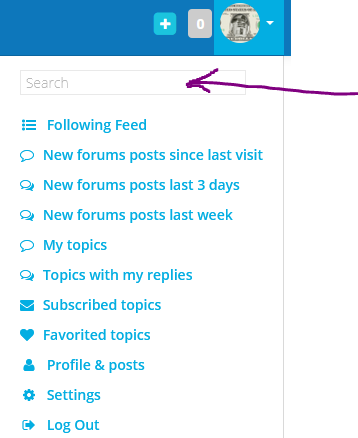
    Should you want to go ahead with coding some lines with macd and stochastic without taking the course, then you have a search engine internal to the site with lots of topics having already discussed the same thing, you just need to hover your mouse over your avatar in top right corner of the page, and enter your search keywords in first line of drop down menu appearing (see image attached)

Viewing 2 posts - 1 through 2 (of 2 total)
  • You must be logged in to reply to this topic.

Coding Stochastic and MACD rise


ProBuilder: Indicators & Custom Tools

New Reply
Author
author-avatar
cyrillic @cyrillic Participant
Summary

This topic contains 1 reply,
has 2 voices, and was last updated by JC_Bywan

3 years, 3 months ago.

Topic Details
Forum: ProBuilder: Indicators & Custom Tools
Language: English
Started: 11/05/2022
Status: Active
Attachments: 1 files
Logo Logo
Loading...
