


Conversion of regression intercept indicator

Viewing 3 posts - 1 through 3 (of 3 total)

  • Author
    Posts
  • #161311 quote
    cc267
    Participant
    Average

    Hello, I have not come across one in the library, can anyone help with converting this regression intercept indicator originally posted on tradingview – https://www.tradingview.com/v/2roMOB3L/

    For some reason its not letting me insert the code with the PRT function, I just get a white box appear with no input area to input the code.

    #161312 quote
    cc267
    Participant
    Average
    //@version=4
    ////////////////////////////////////////////////////////////
    //  Copyright by HPotter v1.1 30/05/2020
    // Linear Regression Intercept is one of the indicators calculated by using the 
    // Linear Regression technique. Linear regression indicates the value of the Y 
    // (generally the price) when the value of X (the time series) is 0. Linear 
    // Regression Intercept is used along with the Linear Regression Slope to create 
    // the Linear Regression Line. The Linear Regression Intercept along with the Slope 
    // creates the Regression line.
    //
    // WARNING:
    // - This script to change bars colors.
    ////////////////////////////////////////////////////////////
    study(title="Line Regression Intercept Strategy", overlay = true)
    Length = input(14, minval=1)
    xSeria = input(title="Source", type=input.source, defval=close)
    xX = Length * (Length - 1) * 0.5
    xDivisor = xX * xX - Length * Length * (Length - 1) * (2 * Length - 1) / 6
    xXY = 0.0
    pos = 0
    for i = 0 to Length-1
    	xXY := xXY + (i * xSeria[i])
    xSlope = (Length * xXY - xX * sum(xSeria, Length)) / xDivisor
    xLRI = (sum(xSeria, Length) - xSlope * xX) / Length
    pos := iff(close > xLRI, 1,
             iff(close < xLRI, -1, nz(pos[1], 0))) 
    barcolor(pos == -1 ? color.red: pos == 1 ? color.green : color.blue )
    plot(xLRI, color=color.blue, title="LRI")
    #263114 quote
    Nicolas
    Keymaster
    Legend

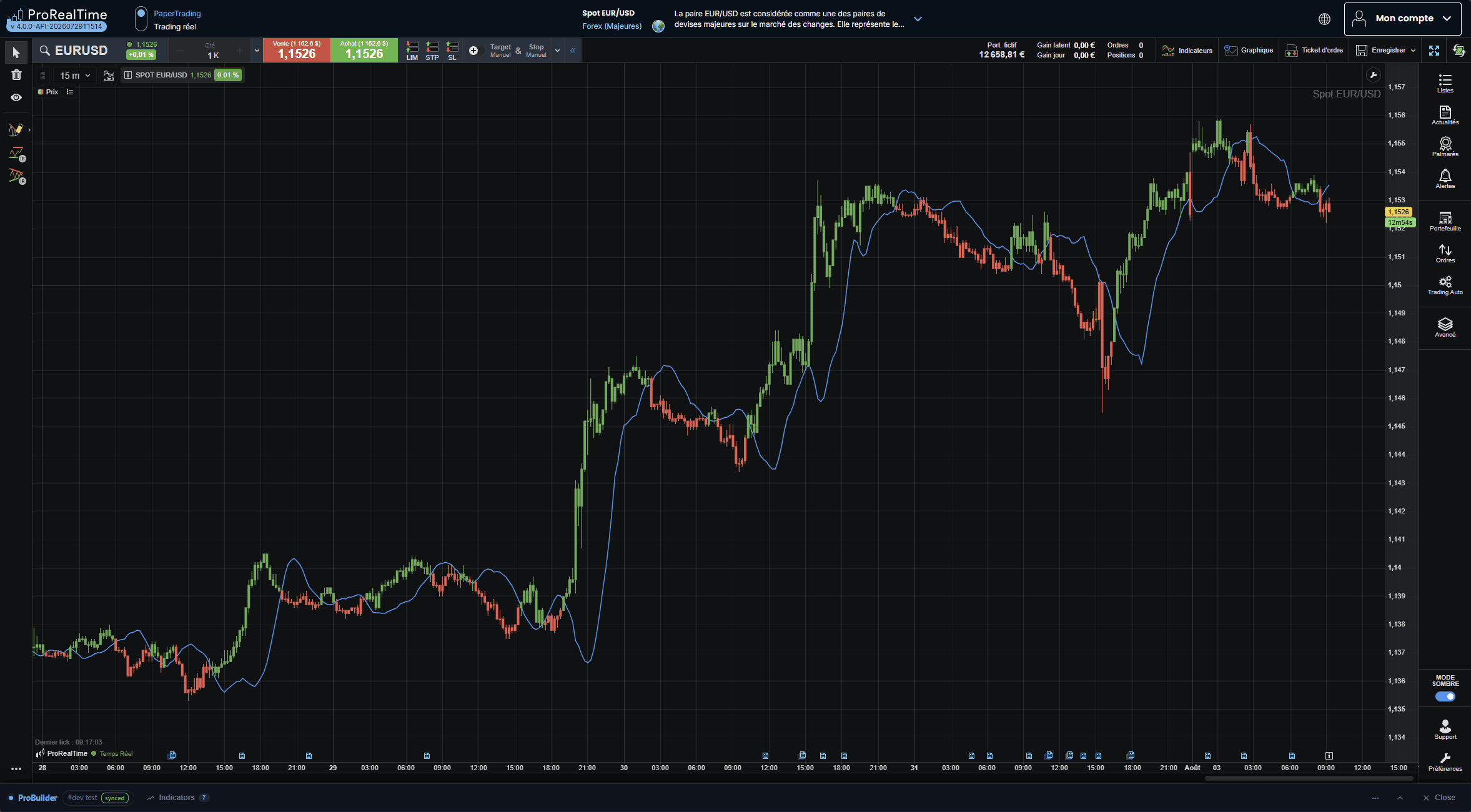
    Hi, a bit late here, but stumble upon your topic because of a query about intercept calculation.

    Here is the translated code:

    Length = 14
    
    
    xX = Length * (Length - 1) * 0.5
    xDivisor = xX * xX - Length * Length * (Length - 1) * (2 * Length - 1) / 6
    
    
    xLRI = undefined
    
    
    IF barindex >= Length - 1 THEN
        xXY = 0
        FOR i = 0 TO Length - 1 DO
            xXY = xXY + i * close[i]
        NEXT
        xSum = Summation[Length](close)
        xSlope = (Length * xXY - xX * xSum) / xDivisor
        xLRI = (xSum - xSlope * xX) / Length
    ENDIF
    
    
    IF close > xLRI THEN
        pos = 1
    ELSIF close < xLRI THEN
        pos = -1
    ELSE
        pos = pos[1]
    ENDIF
    
    
    IF pos = -1 THEN
        cR = 255 
        cG = 82 
        cB = 82
    ELSIF pos = 1 THEN
        cR = 76 
        cG = 175 
        cB = 80
    ELSE
        cR = 33 
        cG = 150 
        cB = 243
    ENDIF
    
    
    DRAWCANDLE(open, high, low, close) COLOURED(cR, cG, cB) BORDERCOLOR(cR, cG, cB)
    
    
    RETURN xLRI COLOURED(33, 150, 243) AS "LRI"


    Line-Regression-Intercept-Strategy.png Line-Regression-Intercept-Strategy.png
Viewing 3 posts - 1 through 3 (of 3 total)
  • You must be logged in to reply to this topic.

ProRealAI ProRealAI New

Stuck on this ProBuilder code?

Describe what this topic is trying to build, in plain English, and ProRealAI writes the ProRealTime™ indicator, screener or system for you.

Available in 7 languages
Try ProRealAI

Conversion of regression intercept indicator


ProBuilder: Indicators & Custom Tools

New Reply
Author
author-avatar
cc267 @cc267 Participant
Summary

This topic contains 2 replies,
has 2 voices, and was last updated by Nicolas

1 month, 1 week ago.

Topic Details
Forum: ProBuilder: Indicators & Custom Tools
Language: English
Started: 02/13/2021
Status: Active
Attachments: 1 files
Logo Logo
Loading...

