Convert from Tradingview to PRT

Viewing 5 posts - 1 through 5 (of 5 total)

  • Author
    Posts
  • #218757 quote
    lukasmartenslukasmartens
    Participant
    New

    Hello,
    I have a code in tradingview that I have tried to convert to PRT but I struggeling.

    The code in Tradingview is:

    I dont need the plot shapes and so on just the indicator.

    src = input(defval=close, title=’Source’)
    per = input.int(defval=100, minval=1, title=’Sampling Period’)
    mult = input.float(defval=3.0, minval=0.1, title=’Range Multiplier’)
    smoothrng(x, t, m) =>
        wper = t * 2 – 1
        avrng = ta.ema(math.abs(x – x[1]), t)
        smoothrng = ta.ema(avrng, wper) * m
        smoothrng
    smrng = smoothrng(src, per, mult)
    rngfilt(x, r) =>
        rngfilt = x
        rngfilt := x > nz(rngfilt[1]) ? x – r < nz(rngfilt[1]) ? nz(rngfilt[1]) : x – r : x + r > nz(rngfilt[1]) ? nz(rngfilt[1]) : x + r
        rngfilt
    filt = rngfilt(src, smrng)
    upward = 0.0
    upward := filt > filt[1] ? nz(upward[1]) + 1 : filt < filt[1] ? 0 : nz(upward[1])
    downward = 0.0
    downward := filt < filt[1] ? nz(downward[1]) + 1 : filt > filt[1] ? 0 : nz(downward[1])
    hband = filt + smrng
    lband = filt – smrng
    filtcolor = upward > 0 ? color.lime : downward > 0 ? color.red : color.orange
    barcolor = src > filt and src > src[1] and upward > 0 ? color.lime : src > filt and src < src[1] and upward > 0 ? color.green : src < filt and src < src[1] and downward > 0 ? color.red : src < filt and src > src[1] and downward > 0 ? color.maroon : color.orange
    filtplot = plot(filt, color=filtcolor, linewidth=3, title=’Range Filter’)
    hbandplot = plot(hband, color=color.new(color.aqua, 100), title=’High Target’)
    lbandplot = plot(lband, color=color.new(color.fuchsia, 100), title=’Low Target’)
    fill(hbandplot, filtplot, color=color.new(color.aqua, 90), title=’High Target Range’)
    fill(lbandplot, filtplot, color=color.new(color.fuchsia, 90), title=’Low Target Range’)
    barcolor(barcolor)
    longCond = bool(na)
    shortCond = bool(na)
    longCond := src > filt and src > src[1] and upward > 0 or src > filt and src < src[1] and upward > 0
    shortCond := src < filt and src < src[1] and downward > 0 or src < filt and src > src[1] and downward > 0
    CondIni = 0
    CondIni := longCond ? 1 : shortCond ? -1 : CondIni[1]
    longCondition = longCond and CondIni[1] == -1
    shortCondition = shortCond and CondIni[1] == 1
    plotshape(longCondition, title=’Buy Signal’, text=’LONG’, textcolor=color.new(color.white, 0), style=shape.labelup, size=size.normal, location=location.belowbar, color=color.new(color.green, 0))
    plotshape(shortCondition, title=’Sell Signal’, text=’SHORT’, textcolor=color.new(color.white, 0), style=shape.labeldown, size=size.normal, location=location.abovebar, color=color.new(color.red, 0))
    alertcondition(longCondition, title=’Buy Alert’, message=’BUY’)
    alertcondition(longCondition, title=’Buy Alert’, message=’BUY’)
    alertcondition(longCondition, title=’Buy Alert’, message=’BUY’)
    alertcondition(shortCondition, title=’Sell Alert’, message=’SELL’)
    #218758 quote
    lukasmartenslukasmartens
    Participant
    New

    As far I have tried:


    indicator(title=’LONG SHORT ASR’, overlay=true)
    src = input(defval=close, title=’Source’)
    per = input.int(defval=100, minval=1, title=’Sampling Period’)
    mult = input.float(defval=3.0, minval=0.1, title=’Range Multiplier’)
    src = close
    perioddefault = 100
    periodminvalue = 1
    mult = 3.0
    multmin = 0.1
    smoothrng = Abs(x / t / m)
      wper = t * 2 – 1
     avrng = exponensial.average(abs(x – x[1]), t)
     smoothrng = exponensial.average(avrng, wper) * m
     smoothrng
     smrng = smoothrng(src / per / mult)
    rngfilt = abs(x / r) =>
    rngfilt abs(x / r) =
        float filt = x
        prevFilt = nz(rngfilt[1])
        if x > prevFilt then
            filt = min(x – r, prevFilt)
        else
            filt = max(x + r, prevFilt)
    endif
    filt = rngfilt(src, smrng)
    var float upward = 0.0
    upward = iff(filt > filt[1], nz(upward[1]) + 1, iff(filt < filt[1], 0, nz(upward[1])))
    downward = 0.0
    downward = iff(filt < filt[1], nz(downward[1]) + 1, iff(filt > filt[1], 0, nz(downward[1])))
    hband = filt + smrng
    lband = filt – smrng
    boolean longCond = false
    boolean shortCond = false
    longCond = (src > filt and src > src[1] and upward > 0) or (src > filt and src < src[1] and upward > 0)
    shortCond = (src < filt and src < src[1] and downward > 0) or (src < filt and src > src[1] and downward > 0)
    CondIni = 0
    CondIni = iff(longCond, 1, iff(shortCond, -1, CondIni[1]))
    longCondition = longCond and CondIni[1] = -1
    shortCondition = shortCond and CondIni[1] = 1
    #218776 quote
    NicolasNicolas
    Keymaster
    Legend

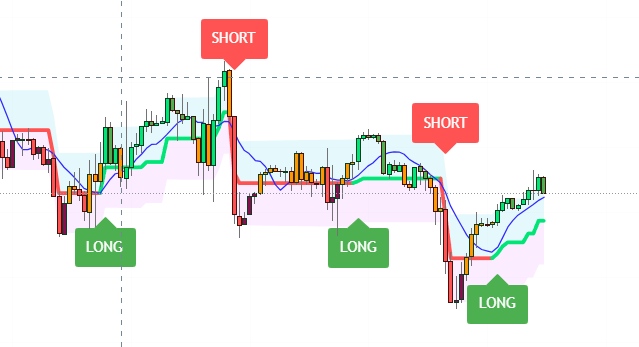
    Please share a picture of what it looks like on a price chart.

    #218789 quote
    JSJS
    Participant
    Master

    Hi @lukasmartens


    This is the code of a “Range Filter”…

    There is a “Twin Range Filter” in the library that gives the same results when you adjust the settings of the second filter…


    Twin Range Filter

    lukasmartens thanked this post
    Scherm­afbeelding-2023-08-09-om-11.22.33.png Scherm­afbeelding-2023-08-09-om-11.22.33.png
    #218795 quote
    lukasmartenslukasmartens
    Participant
    New
Viewing 5 posts - 1 through 5 (of 5 total)

  • You must be logged in to reply to this topic.

ProRealAI ProRealAI New

Stuck on this ProBuilder code?

Describe what this topic is trying to build, in plain English, and ProRealAI writes the ProRealTime™ indicator, screener or system for you.

Available in 7 languages
Try ProRealAI

Convert from Tradingview to PRT


ProBuilder: Indicators & Custom Tools

New Reply
Author
Summary

This topic contains 4 replies,
has 3 voices, and was last updated by lukasmartenslukasmartens
3 years, 1 month ago.

Topic Details
Forum: ProBuilder: Indicators & Custom Tools
Language: English
Started: 08/09/2023
Status: Active
Attachments: 2 files
ProRealCode ProRealCode
Loading...