Harmonic pattern indicator

Viewing 2 posts - 1 through 2 (of 2 total)
  • Author
    Posts
  • #176807 quote
    bharathr15bharathr15
    Participant
    Average

    Hello,

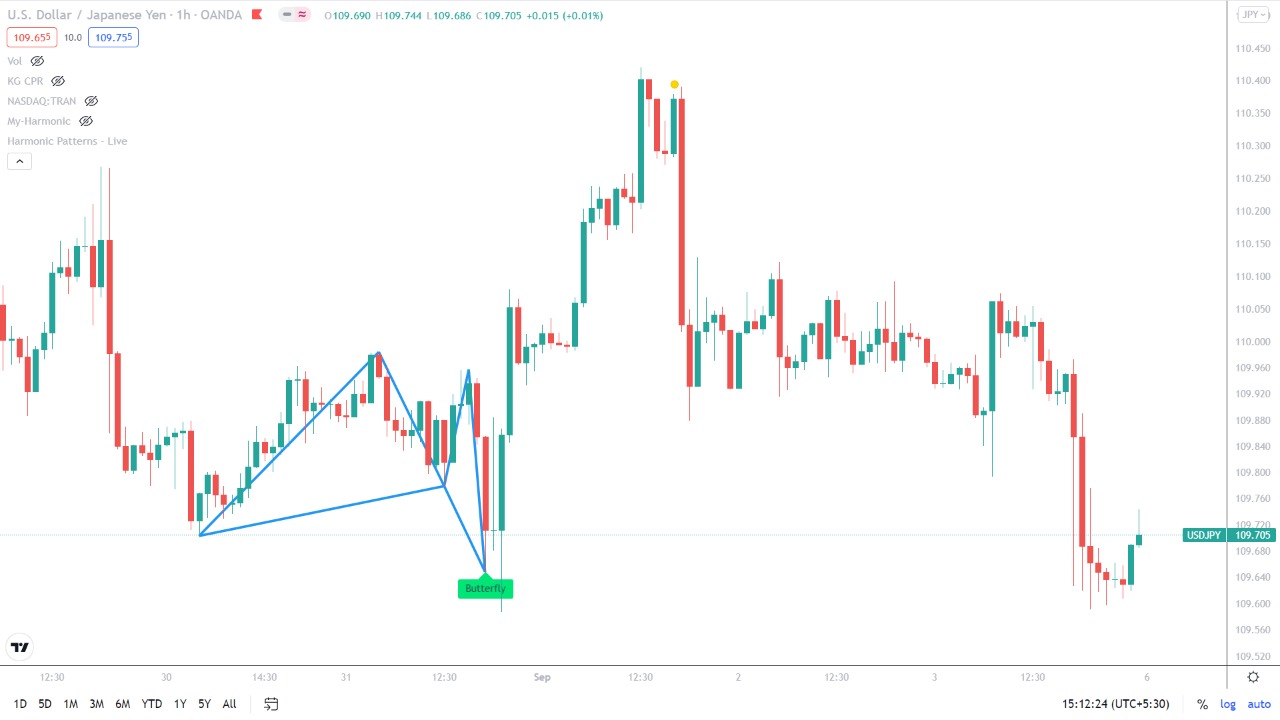
    With reference to the topic didn’t available in PRT . Kindly request you to convert below mentioned code (pine script code converter into probuilder code) Thank you…


    //@version=4
    study(“My-Harmonic”,overlay=true)
    lb = input(10, title=”Left Bars”, minval=1)
    rb = input(10, title=”Right Bars”, minval=1)
    er = input(2.0 , title=”Error %”)
    lw = input(2 , title=”Line width”)
    showpivot = input(true, title=”Show Pivot Points”)
    chdashed = input(true, title=”Show Old Line as Dashed”)
    mb = lb + rb + 1
    float top = na
    float bot = na
    top := iff(not na(high[mb]), iff(highestbars(high, mb) == -rb, high[rb], na), na) // Pivot High
    bot := iff(not na(low[mb]), iff(lowestbars(low, mb) == -rb, low[rb], na), na) // Pivot Low

    plotshape(top, style=shape.circle , offset = -rb , color = color.black , location = location.absolute)
    plotshape(bot, style=shape.circle , offset = -rb , color = color.black , location = location.absolute)

    //================================================================================================

    t0 = valuewhen(top,bar_index,0) // Pivot High index
    t1 = valuewhen(top,bar_index,1)
    t2 = valuewhen(top,bar_index,2)
    t3 = valuewhen(top,bar_index,3)

    b0 = valuewhen(bot,bar_index,0) // Pivot Low index
    b1 = valuewhen(bot,bar_index,1)
    b2 = valuewhen(bot,bar_index,2)
    b3 = valuewhen(bot,bar_index,3)

    t0v = valuewhen(top,top,0) // Pivot High Value
    t1v = valuewhen(top,top,1)
    t2v = valuewhen(top,top,2)
    t3v = valuewhen(top,top,3)

    b0v = valuewhen(bot,bot,0) // Pivot Low Value
    b1v = valuewhen(bot,bot,1)
    b2v = valuewhen(bot,bot,2)
    b3v = valuewhen(bot,bot,3)

    // Gartlay checking
    gartlay(x , a , b , c , xv , av , bv , cv , tb) =>
    ptn = 0
    abr = abs((av – bv) / (av – xv))
    bcr = abs((cv – bv) / (av – bv))
    if abr > (0.618 – er/100) and abr < (0.618 + er/100) and bcr > ( 0.382 – er/100) and bcr < ( 0.886 + er/100)
    if tb == 1
    if xv < av and bv < av and bv < cv
    ptn := 1
    if tb == 2
    if xv > av and bv > av and bv > cv
    ptn := 2
    ptn

    // Draw Harmonic Pattern
    drawpattern(x , a , b , c , xv , av , bv , cv , p)=>
    pattern = (p == 1) ? “Bull Gartlay” : (p == 2) ? “Bear Gartlay” : “No”
    yl = (p == 1) ? yloc.belowbar : yloc.abovebar
    stl = (p == 1) ? label.style_label_up : label.style_label_down
    col = (p == 1) ? color.green : color.red
    dv = av – 0.786*(av – xv)
    line.new(x – rb, xv , a -rb ,av, color = color.blue, extend = extend.none , width = lw)
    line.new(a – rb, av , b -rb ,bv, color = color.blue, extend = extend.none , width = lw)
    line.new(b – rb, bv , c -rb ,cv, color = color.blue, extend = extend.none , width = lw)
    line.new(x – rb, xv , b -rb ,bv, color = color.blue, extend = extend.none , width = lw)
    line.new(c – rb, cv , bar_index ,dv, color = color.blue, extend = extend.none , width = lw)
    line.new(b – rb, bv , bar_index ,dv, color = color.blue, extend = extend.none , width = lw)
    label.new(bar_index – rb, low, text= pattern, color = col , yloc = yl , style = stl)

    tb = top ? 1 : bot ? 2 : 0
    plot(tb , offset = -rb)
    if tb ==1
    if b2 < t2 and t2 < b1
    p = gartlay(b2 , t2 , b1 , t0 , b2v , t2v , b1v , t0v , tb)
    if p > 0
    drawpattern(b2 , t2 , b1 , t0 , b2v , t2v , b1v , t0v , p)
    if b2 < t2 and t2 < b0
    p = gartlay(b2 , t2 , b0 , t0 , b2v , t2v , b0v , t0v , tb)
    if p > 0
    drawpattern(b2 , t2 , b0 , t0 , b2v , t2v , b0v , t0v , p)

    if b2 < t1 and t1 < b1
    p = gartlay(b2 , t1 , b1 , t0 , b2v , t1v , b1v , t0v , tb)
    if p > 0
    drawpattern(b2 , t1 , b1 , t0 , b2v , t1v , b1v , t0v , p)

    if b2 < t1 and t1 < b0
    p = gartlay(b2 , t1 , b0 , t0 , b2v , t1v , b0v , t0v , tb)
    if p > 0
    drawpattern(b2 , t1 , b0 , t0 , b2v , t1v , b0v , t0v , p)
    if b1 < t2 and t2 < b0
    p = gartlay(b1 , t2 , b0 , t0 , b1v , t2v , b0v , t0v , tb)
    if p > 0
    drawpattern(b1 , t2 , b0 , t0 , b1v , t2v , b0v , t0v , p)

    if b1 < t1 and t1 < b0
    p = gartlay(b1 , t1 , b0 , t0 , b1v , t1v , b0v , t0v , tb)
    if p >0
    drawpattern(b1 , t1 , b0 , t0 , b1v , t1v , b0v , t0v , p)

    if tb == 2
    if t2 < b2 and b2 < t1
    p = gartlay(t2 , b2 , t1 , b0 , t2v , b2v , t1v , b0v , tb)
    if p > 0
    drawpattern(t2 , b2 , t1 , b0 , t2v , b2v , t1v , b0v , p)
    if t2 < b2 and b2 < t0
    p = gartlay(t2 , b2 , t0 , b0 , t2v , b2v , t0v , b0v , tb)
    if p > 0
    drawpattern(t2 , b2 , t0 , b0 , t2v , b2v , t0v , b0v , p)

    if t2 < b1 and b1 < t1
    p = gartlay(t2 , b1 , t1 , b0 , t2v , b1v , t1v , b0v , tb)
    if p > 0
    drawpattern(t2 , b1 , t1 , b0 , t2v , b1v , t1v , b0v , p)

    if t2 < b1 and b1 < t0
    p = gartlay(t2 , b1 , t0 , b0 , t2v , b1v , t0v , b0v , tb)
    if p > 0
    drawpattern(t2 , b1 , t0 , b0 , t2v , b1v , t0v , b0v , p)
    if t1 < b2 and b2 < t0
    p = gartlay(t1 , b2 , t0 , b0 , t1v , b2v , t0v , b0v , tb)
    if p > 0
    drawpattern(t1 , b2 , t0 , b0 , t1v , b2v , t0v , b0v , p)

    if t1 < b1 and b1 < t0
    p = gartlay(t1 , b1 , t0 , b0 , t1v , b1v , t0v , b0v , tb)
    if p >0
    drawpattern(t1 , b1 , t0 , b0 , t1v , b1v , t0v , b0v , p)

    Harmonic-pattern.jpeg Harmonic-pattern.jpeg
    #191894 quote
    NicolasNicolas
    Keymaster
    Legend

    Great and professional harmonic patterns tools available for ProRealTime: https://market.prorealcode.com/?s=harmonic&post_type=product

Viewing 2 posts - 1 through 2 (of 2 total)
  • You must be logged in to reply to this topic.

ProRealAI ProRealAI New

Stuck on this ProBuilder code?

Describe what this topic is trying to build, in plain English, and ProRealAI writes the ProRealTime™ indicator, screener or system for you.

Available in 7 languages
Try ProRealAI

Harmonic pattern indicator


ProBuilder: Indicators & Custom Tools

New Reply
Author
author-avatar
bharathr15 @bharathr15 Participant
Summary

This topic contains 1 reply,
has 2 voices, and was last updated by NicolasNicolas

4 years, 5 months ago.

Topic Details
Forum: ProBuilder: Indicators & Custom Tools
Language: English
Started: 09/05/2021
Status: Active
Attachments: 1 files
ProRealCode ProRealCode
Loading...