Entry and exit based on bollinger bands touches

Viewing 8 posts - 1 through 8 (of 8 total)
  • Author
    Posts
  • #208253 quote
    skuggan89
    Participant
    New

    Hi, don’t know if this is the right forum, but i’m having trouble finding answers on google.

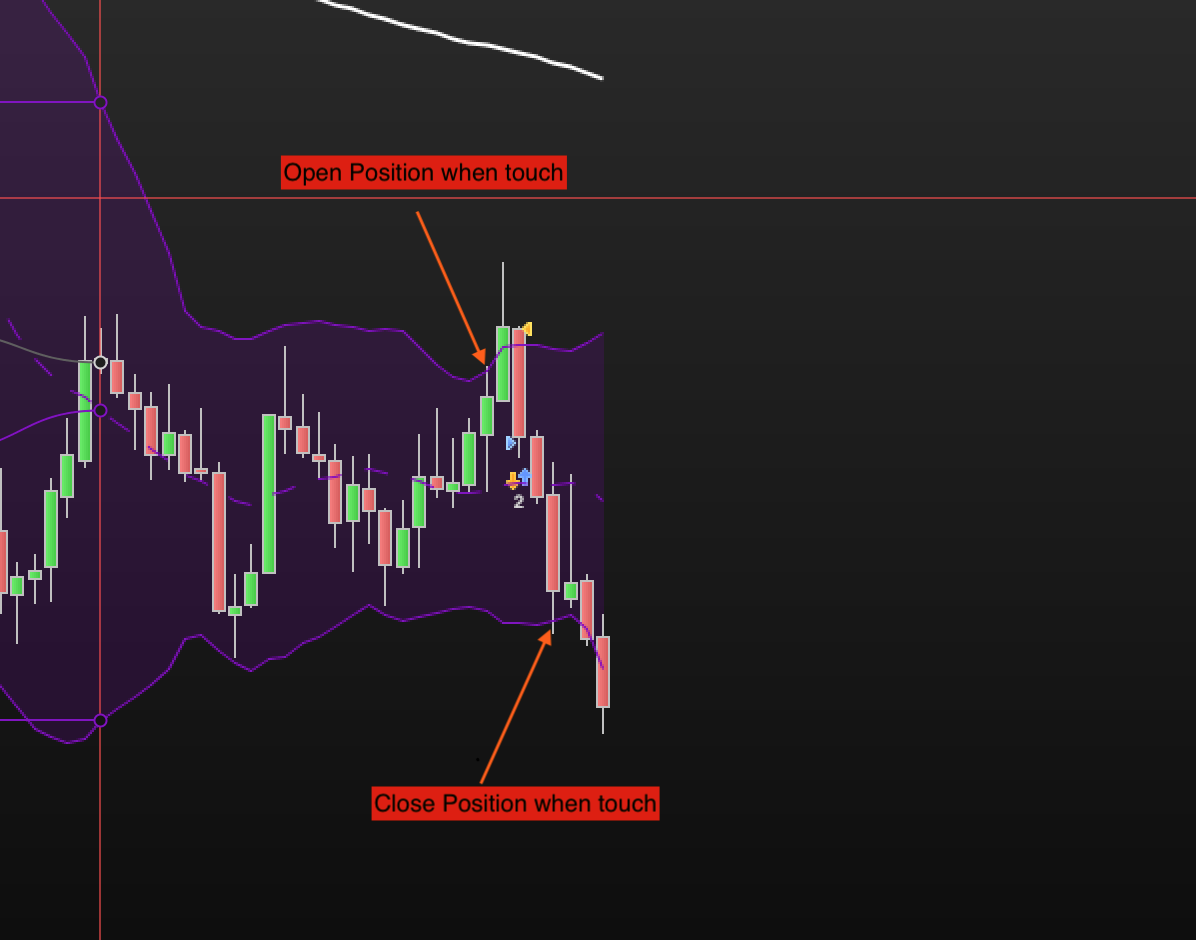
    I need help with a simple thing in the trading system. How do I write the code so that a position is opened when the price touches the upper bollinger band and closes the position when the price touches the lower bollinger band?

    I have only managed to get the position to open if the candle CLOSES outside the upper bollinger band.

    Grateful for help!

    #208255 quote
    JC_Bywan
    Moderator
    Master

    Hi,

    please take into account forum guidance in yellow box at bottom of this page for subsequent posts, here in particular the “meaningful title” rule to prevent topics being all called “help with…”), thanks. I edit your title “help with code” to replace it by “entry and exit based on bollinger bands touches”.

    #208263 quote
    Nicolas
    Keymaster
    Master

    We can use pending limit orders placed on bollingerbands to trigger entries at the right price.

    defparam cumulateorders=false
    
    if not longonmarket then 
     buy 1 contract at BollingerDown[20](close) limit 
    endif 
    if not shortonmarket then 
     sellshort 1 contract at BollingerUp[20](close) limit 
    endif
    
    coincatcha thanked this post
    #208266 quote
    skuggan89
    Participant
    New

    Thank you for the fast response, im new to this, so how exactly would i intergrate this into my code today?

    This is my code:

    // Definition of code parameters
    DEFPARAM CumulateOrders = False // Cumulating positions deactivated
    
    // Conditions to enter long positions
    indicator1 = ExponentialAverage[200](close)
    c1 = (close > indicator1)
    indicator2 = BollingerDown[20](close)
    c2 = (close <= indicator2)
    
    IF c1 AND c2 THEN
    BUY 0.55 CONTRACT AT MARKET
    ENDIF
    
    // Conditions to exit long positions
    indicator3 = BollingerUp[20](close)
    c3 = (close >= indicator3)
    
    IF c3 THEN
    SELL AT MARKET
    ENDIF
    
    // Conditions to enter short positions
    indicator4 = ExponentialAverage[200](close)
    c4 = (close <= indicator4)
    indicator5 = BollingerUp[20](close)
    c5 = (close >= indicator5)
    
    IF c4 AND c5 THEN
    SELLSHORT 0.55 CONTRACT AT MARKET
    ENDIF
    
    // Conditions to exit short positions
    indicator6 = BollingerDown[20](close)
    c6 = (close <= indicator6)
    
    IF c6 THEN
    EXITSHORT AT MARKET
    ENDIF
    
    // Stops and targets
    SET STOP pTRAILING 16
    SET TARGET pPROFIT 16
    #208311 quote
    Nicolas
    Keymaster
    Master

    So I replace your original entries with the ones I coded above:

    // Definition of code parameters
    DEFPARAM CumulateOrders = False // Cumulating positions deactivated
    
    // Conditions to enter long positions
    indicator1 = ExponentialAverage[200](close)
    c1 = (close > indicator1)
    
    IF c1 THEN
    buy 0.55 contract at BollingerDown[20](close) limit 
    ENDIF
    
    // Conditions to exit long positions
    indicator3 = BollingerUp[20](close)
    c3 = (close >= indicator3)
    
    IF c3 THEN
    SELL AT MARKET
    ENDIF
    
    // Conditions to enter short positions
    indicator4 = ExponentialAverage[200](close)
    c4 = (close <= indicator4)
    
    IF c4 THEN
    sellshort 0.55 contract at BollingerUp[20](close) limit 
    ENDIF
    
    // Conditions to exit short positions
    indicator6 = BollingerDown[20](close)
    c6 = (close <= indicator6)
    
    IF c6 THEN
    EXITSHORT AT MARKET
    ENDIF
    
    // Stops and targets
    SET STOP pTRAILING 16
    SET TARGET pPROFIT 16

    not tested

    Midlanddave thanked this post
    #208363 quote
    skuggan89
    Participant
    New

    Thank you so much for the help!

    #208439 quote
    skuggan89
    Participant
    New

    I have tried to play around a bit but don’t seam to get it to work, how do i write the code if i alos want the exit of the trade to trigger when price hits the bollinger band? I assume the principal would be the same with pending limit orders?

    #208508 quote
    Nicolas
    Keymaster
    Master

    Exit on bollinger bands are already defined in your code, but you are using the Close, you can use a precise price touch as define in the below modification:

    // Definition of code parameters
    DEFPARAM CumulateOrders = False // Cumulating positions deactivated
    
    // Conditions to enter long positions
    indicator1 = ExponentialAverage[200](close)
    c1 = (close > indicator1)
    
    IF c1 THEN
    buy 0.55 contract at BollingerDown[20](close) limit 
    set target price BollingerUp[20](close)
    ENDIF
    
    if longonmarket then 
     set target price BollingerUp[20](close)
    endif 
    
    // Conditions to exit long positions
    indicator3 = BollingerUp[20](close)
    c3 = (close >= indicator3)
    
    IF c3 THEN
    SELL AT MARKET
    ENDIF
    
    // Conditions to enter short positions
    indicator4 = ExponentialAverage[200](close)
    c4 = (close <= indicator4)
    
    IF c4 THEN
    sellshort 0.55 contract at BollingerUp[20](close) limit 
    set target price BollingerDown[20](close)
    ENDIF
    
    if shortonmarket then 
     set target price BollingerDown[20](close)
    endif 
    
    // Conditions to exit short positions
    indicator6 = BollingerDown[20](close)
    c6 = (close <= indicator6)
    
    IF c6 THEN
    EXITSHORT AT MARKET
    ENDIF
    
    // Stops and targets
    SET STOP pTRAILING 16
    SET TARGET pPROFIT 16
    skuggan89 thanked this post
Viewing 8 posts - 1 through 8 (of 8 total)

  • You must be logged in to reply to this topic.

Entry and exit based on bollinger bands touches


ProOrder support

New Reply
Author
author-avatar
skuggan89 @skuggan89 Participant
Summary

This topic contains 7 replies,
has 3 voices, and was last updated by Nicolas

2 years, 12 months ago.

Topic Details
Forum: ProOrder support
Language: English
Started: 01/25/2023
Status: Active
Attachments: 1 files
Logo Logo
Loading...