how to count zigzag moves

Viewing 5 posts - 1 through 5 (of 5 total)
  • Author
    Posts
  • #215033 quote
    renzocarioca
    Participant
    Junior

    Hi

    I would like to count the quantity of zigzag moves of an index/security of a chart

    ex: zigzag moves of 5% of the SPX index

    I have tried a few things but what I get is kind strange,  is it possible? The last attempt was this one but it gives an error message (the following variable is undefined: count )

    thank you

    a= ZigZagPoint[10](close)
    b=count[a]
    c=cumsum (b)
    return c

    #215034 quote
    robertogozzi
    Moderator
    Legend

    Firstly, COUNT is not defined anywhere thus can’t be used.

    Secondly, ZIGZAG returns a value each bar, it doesn’t count swing points, so counting it will return a huge number.

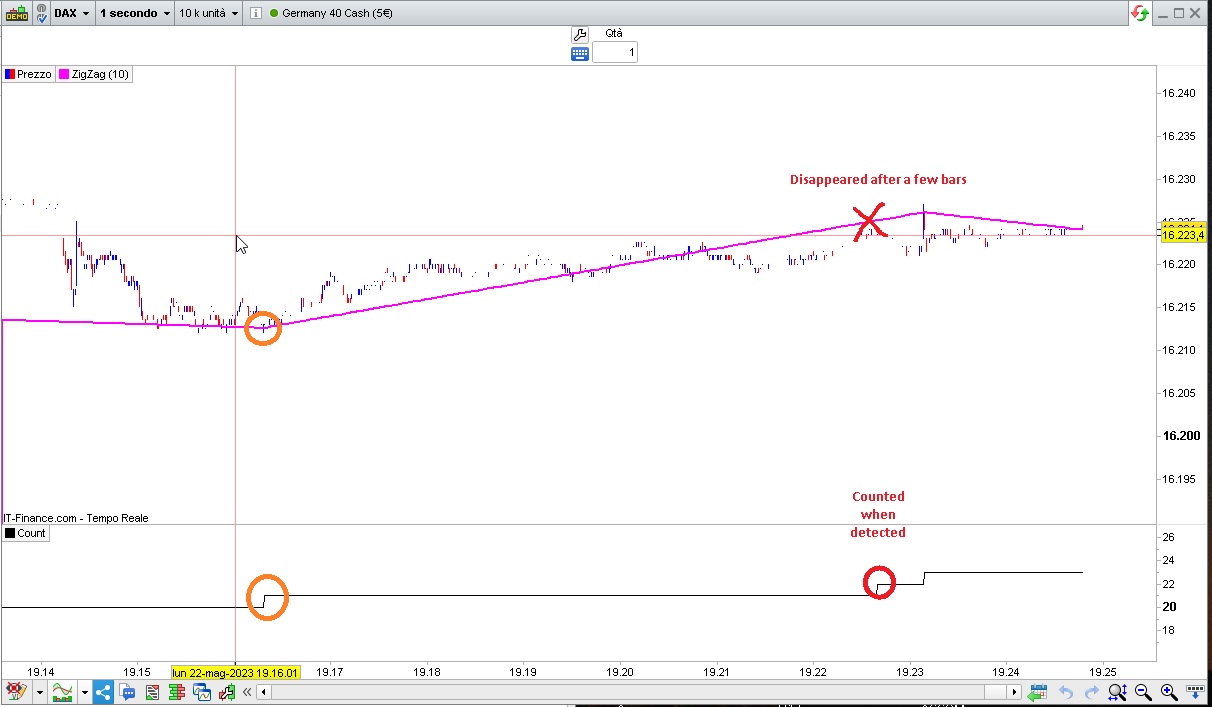
    Thirdly, you can count swing points with this code, but it’s useless as it’s a repainting, so it may change any swing point several bars after they have already been counted as you will easily spot on a 1-second TF (see my attached pic):

    ONCE Count = 0
    myZZ    = ZigZagPoint[10](close)
    SwingHI = (myZZ < myZZ[1]) AND (myZZ[1] > myZZ[2])
    SwingLO = (myZZ > myZZ[1]) AND (myZZ[1] < myZZ[2])
    IF SwingHI OR SwingLO THEN
       c = c + 1
    ENDIF
    return c AS "Count"
    ZigZag-count.jpg ZigZag-count.jpg
    #215036 quote
    JS
    Participant
    Master
    (Sorry same time as Roberto)

    Hi,

    You can try this one…

    I think the calculation of the ZigZag is incorrect, for example if I set a 5% change (from bottom to top or vice versa) then the number of change (points) is incorrect…??

    PercentChange=5
    
    ZZ=ZigZag[PercentChange](Close)
    
    If ZZ[1]<ZZ[2] and ZZ>ZZ[1] then
    BottomCount=BottomCount+1
    ElsIf ZZ[1]>ZZ[2] and ZZ<ZZ[1] then
    TopCount=TopCount+1
    EndIf
    
    TotalCount=BottomCount+TopCount
    
    Return BottomCount as "BottomCount", TopCount as "TopCount", TotalCount as "TotalCount"

    Scherm­afbeelding-2023-05-22-om-19.32.28.png Scherm­afbeelding-2023-05-22-om-19.32.28.png
    #215045 quote
    renzocarioca
    Participant
    Junior
    Thank you  it works,  just return totalcount    
    PercentChange=5
    
    
    ZZ=ZigZag[PercentChange](Close)
    
    
    If ZZ[1]<ZZ[2] and ZZ>ZZ[1] then
    BottomCount=BottomCount+1
    ElsIf ZZ[1]>ZZ[2] and ZZ<ZZ[1] then
    TopCount=TopCount+1
    EndIf
    
    
    TotalCount=BottomCount+TopCount
    
    
    Return BottomCount as "BottomCount", TopCount as "TopCount", TotalCount as "TotalCount"
     
    #215058 quote
    robertogozzi
    Moderator
    Legend
    Two is better than one 🙂
    renzocarioca thanked this post
Viewing 5 posts - 1 through 5 (of 5 total)

  • You must be logged in to reply to this topic.

ProRealAI ProRealAI New

Stuck on this ProBuilder code?

Describe what this topic is trying to build, in plain English, and ProRealAI writes the ProRealTime™ indicator, screener or system for you.

Available in 7 languages
Try ProRealAI

how to count zigzag moves


ProBuilder: Indicators & Custom Tools

New Reply
Author
Summary

This topic contains 4 replies,
has 3 voices, and was last updated by robertogozzi
3 years, 3 months ago.

Topic Details
Forum: ProBuilder: Indicators & Custom Tools
Language: English
Started: 05/22/2023
Status: Active
Attachments: 2 files
Logo Logo
Loading...