


How to hide a line between two datapoints

Viewing 7 posts - 1 through 7 (of 7 total)

  • Author
    Posts
  • #129239 quote
    darkodarko
    Participant
    Junior

    Hi,

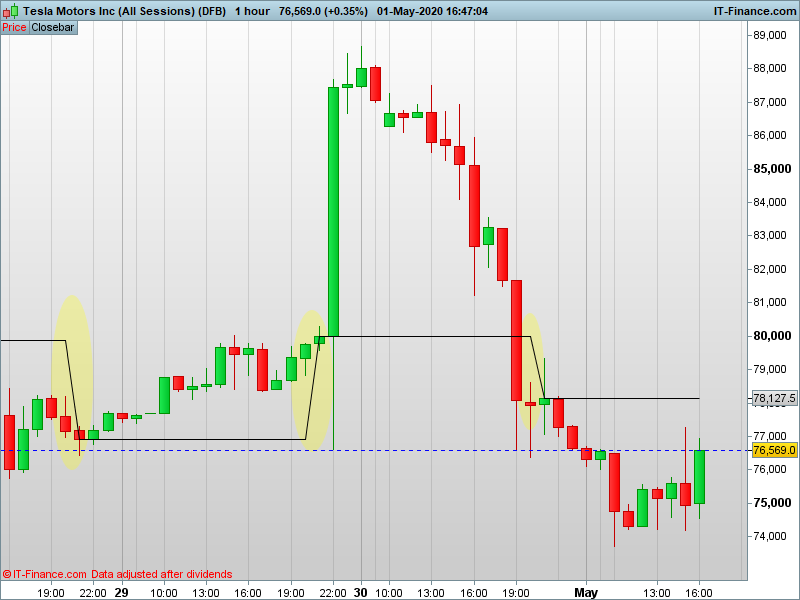
    I have a simple code that draws a line at the market daily closing price (5pm EST), but I don’t know how to hide the oblique line that connects 2 consecutive daily closing prices.

    The code is:

    if Hour=22 then
    a=close
    endif
    return a

    Does anyone know how to hide the oblique that connects each “a” (see chart for more clarity)?

    Thanks

    TSLA-1-hour.png TSLA-1-hour.png
    #129253 quote
    robertogozzirobertogozzi
    Moderator
    Legend

    You can’t, with RETURNed data.

    You have to draw those segments yourself using DRAWSEGMENT.

    #129256 quote
    robertogozzirobertogozzi
    Moderator
    Legend

    I moved your topic to ProBuilder since it’s related to an indicator.

    #129257 quote
    robertogozzirobertogozzi
    Moderator
    Legend

    Try this:

    if Hour=22 then
       a=close
       MyBar = barindex
    endif
    Drawsegment(MyBar,a,barindex,a)
    return
    darko thanked this post
    #129274 quote
    darkodarko
    Participant
    Junior

    Thanks a lot Roberto!

    #129283 quote
    darkodarko
    Participant
    Junior

    Quick question Roberto, how do I change the style of the segment please?

    #129294 quote
    robertogozzirobertogozzi
    Moderator
    Legend

    Only v11 allows to change it (while RETURNed data can always be customized with properties, even in v10.3), if you are using it you can replace line 5 with:

    Drawsegment(MyBar,a,barindex,a) coloured(0,128,0,255) STYLE(line,2)

    In v10.3 you can only add COLOURED to change colour.

    darko thanked this post
Viewing 7 posts - 1 through 7 (of 7 total)
  • You must be logged in to reply to this topic.

ProRealAI ProRealAI New

Stuck on this ProBuilder code?

Describe what this topic is trying to build, in plain English, and ProRealAI writes the ProRealTime™ indicator, screener or system for you.

Available in 7 languages
Try ProRealAI

How to hide a line between two datapoints


ProBuilder: Indicators & Custom Tools

New Reply
Author
author-avatar
darko @darko Participant
Summary

This topic contains 6 replies,
has 2 voices, and was last updated by robertogozzirobertogozzi
6 years, 4 months ago.

Topic Details
Forum: ProBuilder: Indicators & Custom Tools
Language: English
Started: 05/01/2020
Status: Active
Attachments: 1 files
ProRealCode ProRealCode
Loading...

