Indicatore trailing stop

Viewing 4 posts - 1 through 4 (of 4 total)

  • Author
    Posts
  • #203790 quote
    Ciccarelli FrancoCiccarelli Franco
    Participant
    Senior

    Ho importato dalla libreria l’indicatore in oggetto (che allego) di Nicolas, ma non ho capito come utilizzarlo in un trading system.

    Grazie


    //PRC_Another ATR trailing stop | indicator
    //24.09.2019
    //Nicolas @ http://www.prorealcode.com
    //Sharing ProRealTime knowledge

    // — settings
    p=14 //ATR period
    mult=2 //multiplier
    mode=1 //trailing stop mode (0=straight line
    // — end of settings

    atr = AverageTrueRange[p](close) * mult

    once trend=1

    if trend=1 then
    hh=max(hh,close)
    ll=hh
    if atr<atr[1] then
    hhlevel=hh-atr
    if hhlevel>ts then
    ts=hhlevel
    endif
    endif
    r=0
    g=168
    else
    ll=min(ll,close)
    hh=ll
    if atr<atr[1] then
    lllevel=ll+atr
    if lllevel<ts then
    ts=lllevel
    endif
    endif
    r=255
    g=0
    endif

    if close crosses over ts then
    trend=1
    if mode>0 then
    ts=ll
    endif
    elsif close crosses under ts then
    trend=-1
    if mode>0 then
    ts=hh
    endif
    endif

    return ts coloured(r,g,0) style(line,3)

    #203795 quote
    NicolasNicolas
    Keymaster
    Legend

    Il codice di questo argomento dovrebbe funzionare per attivare gli ordini quando il prezzo supera il trailing stop ATR: https://www.prorealcode.com/topic/another-atr-trailing-stop/

    #203808 quote
    Ciccarelli FrancoCiccarelli Franco
    Participant
    Senior

    Ho letto il riferimento , praticamente è la stessa domanda, ma quel codice devo inserirlo nel mio trading system così come è. Inoltre a me l’indicatore si è posizionato al di sotto del grafico.

    Grazie

    #203813 quote
    robertogozzirobertogozzi
    Moderator
    Legend

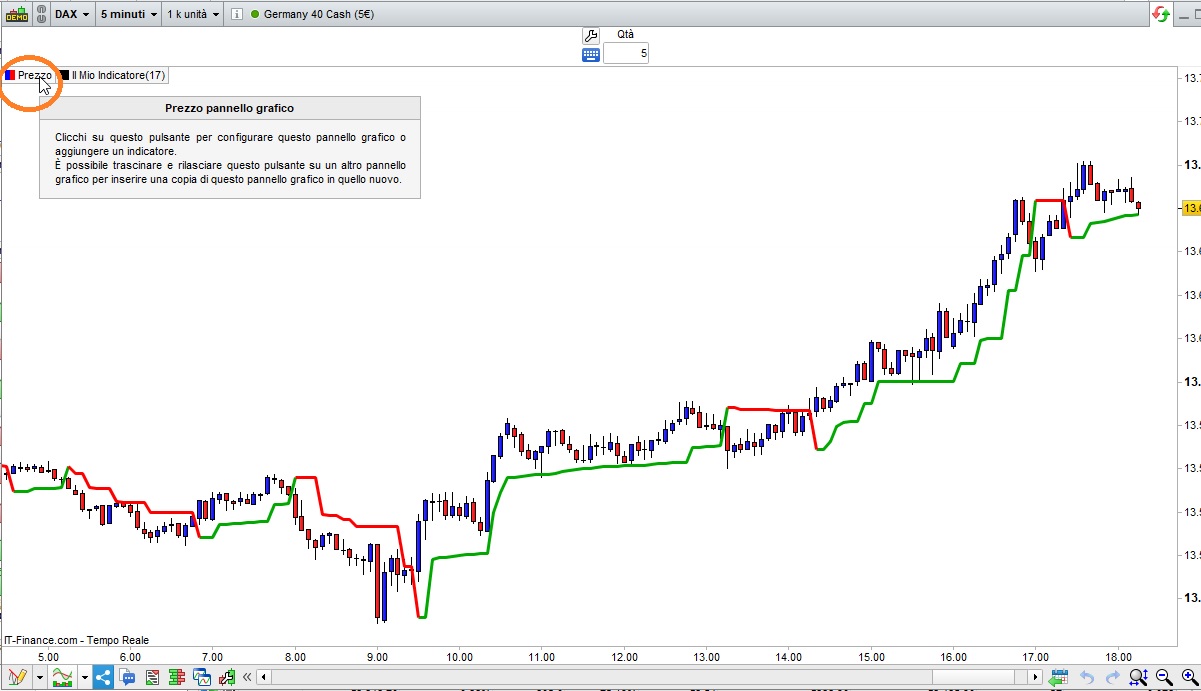
    Per metterlo sul grafico devi cliccare su PREZZO (vedi foto), poi seleziona AGGIUNGERE INDICATORE, quindi scegli il nome dall’elenco.

    x-1.jpg x-1.jpg
Viewing 4 posts - 1 through 4 (of 4 total)
  • You must be logged in to reply to this topic.

ProRealAI ProRealAI New

Stuck on this ProBuilder code?

Describe what this topic is trying to build, in plain English, and ProRealAI writes the ProRealTime™ indicator, screener or system for you.

Available in 7 languages
Try ProRealAI

Indicatore trailing stop


ProBuilder: Indicatori & Strumenti Personalizzati

New Reply
Summary

This topic contains 3 replies,
has 3 voices, and was last updated by robertogozzirobertogozzi
3 years, 10 months ago.

Topic Details
Forum: ProBuilder: Indicatori & Strumenti Personalizzati
Language: Italian
Started: 11/08/2022
Status: Active
Attachments: 1 files
ProRealCode ProRealCode
Loading...