


More options when Exporting – Importing

Viewing 3 posts - 1 through 3 (of 3 total)
  • Author
    Posts
  • #3571 quote
    RicLg
    Participant
    Senior

    Hello,

    Lets says i’d like to sent to a friend only the return’s code, not the code it self.

    return x as “New signal”, y  as “New Position”, z  as “Original Signal”,zz as “Original Position”

    Value1 ,             Value2              ,               Value3             ,   Value4

    Export’s return may like  : date,return Value1, return’s Value2, …..,  ….,

    Let say that friend would like  import these data into Prorealtime.

    Thank for reading

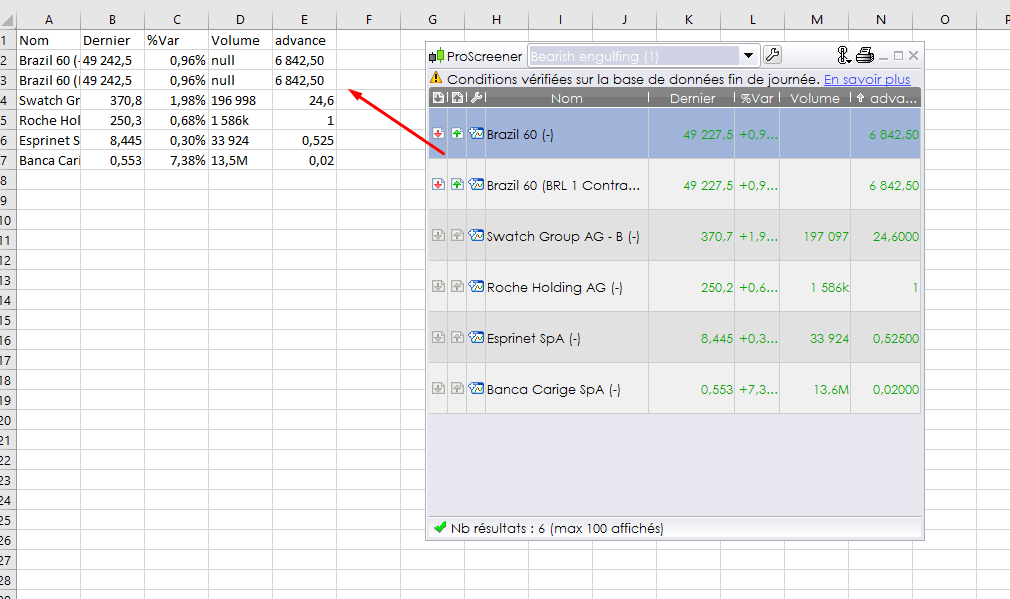
    screener-data-to-excel.png screener-data-to-excel.png
    #3575 quote
    Nicolas
    Keymaster
    Master

    Hello RicLg,

    You can already do that, with a little trick and one value at once, by using ProScreener. The return values are sorted in a table that can be copy/paste to Excel for example, or just swipe them to the Excel sheet area to make the values appear in the cells.

    It works too with ProBacktest results, that’s how I made my deep analysis of strategies.

    #3588 quote
    RicLg
    Participant
    Senior

    Thanks Nicolas for the trick, Nicolas

Viewing 3 posts - 1 through 3 (of 3 total)

  • You must be logged in to reply to this topic.

More options when Exporting – Importing


Platform Support: Charts, Data & Broker Setup

New Reply
Author
author-avatar
RicLg @riclg Participant
Summary

This topic contains 2 replies,
has 2 voices, and was last updated by RicLg

10 years ago.

Topic Details
Forum: Platform Support: Charts, Data & Broker Setup
Language: English
Started: 03/10/2016
Status: Active
Attachments: No files
Logo Logo
Loading...

