Steve Primo strategy 4 – from a veteran trading specialist

Viewing 4 posts - 1 through 4 (of 4 total)
  • Author
    Posts
  • #90051 quote
    Goldensky100
    Participant
    Junior

    Is it possible to covert this ? comes from tradingview

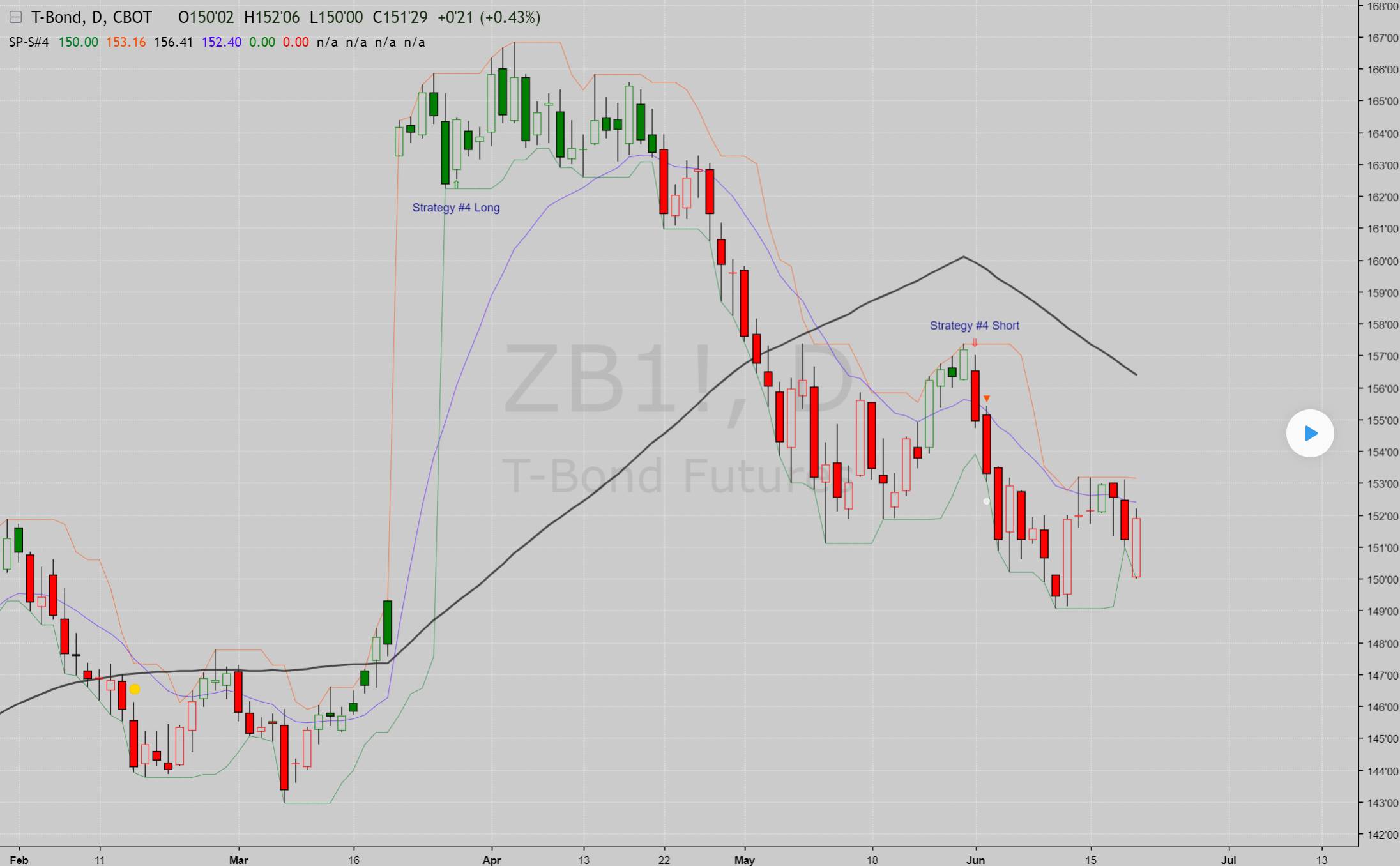
    This is a short term Pullback / Bounce Strategy. Recommend using this on Daily Chart . Option strategies that work the best are (weekly options credit spread).

    ——

    // Created by UCSgears
    // Includes options to confirm with Pet-d
    
    study(shorttitle="SP-S#4", title = "Steve Primo - Strategy #4", overlay = true, precision = 2)
    
    basisma = sma(close,50)
    petd = ema(close,15)
    
    usepetd = input(true, title = "PET-D Confirmation Required")
    
    trendup = usepetd == 1 ? close > basisma and close > petd : close > basisma
    trenddn = usepetd == 1 ? close < basisma and close < petd : close < basisma
    
    // PET-D
    
    petdcolor = close > petd ? green : red
    barcolor (petdcolor)
    
    // Pullback & Bounce Criteria
    lowest = lowest(low,(5))
    highest = highest(high,(5))
    pullback = (low == lowest) or (low[1] == lowest[1]) ? 1 : 0
    bounce = (high == highest) or (high[1] == highest[1]) ? 1 : 0
    
    // ALL PLOT
    plot (lowest, color = green, linewidth = 1, title = "Lower Band")
    plot (highest, color = red, linewidth = 1, title = "Upper Band")
    plot (basisma, color = black, linewidth = 3, title = "Trend - Long Term")
    plot (petd, color = blue, linewidth = 1, title = "Trend - Short Term")
    
    // 25% Close
    range = high - low
    rbrng = abs(open-close)
    // Long Setup
    longcandle = close > low+range*.75 ? 1:0
    // Short Setup
    shortcandle = close < low+range*.25 ? 1:0
    
    //Setups
    setuplong = trendup == 1 and pullback == 1 and longcandle == 1 ? 1:0
    setupshort = trenddn == 1 and bounce == 1 and shortcandle == 1 ? 1:0
    
    //setuplong = setuplonggeneral == 1 and setuplonggeneral[1] == 0 ? 1:0
    //setupshort = setupshortgeneral == 1 and setupshortgeneral[1] == 0 ? 1:0
    
    bcl = rbrng > (rma(tr,5)*1.1) ? blue : green
    bcs = rbrng > (rma(tr,5)*1.1) ? blue : red
    
    plotchar(setuplong, title="Long Setup Bar", char='⇑', location=location.belowbar, color=bcl, transp=0, text="Strategy #4 Long")
    plotchar(setupshort, title="Short Setup Bar", char='⇓', location=location.abovebar, color=bcs, transp=0, text="Strategy #4 Short")
    
    //Trade Trigger
    tiggerlongcandle = (setuplong[1] == 1) and (high > high[1]) ? 1 : 0
    tiggershortcandle = (setupshort[1] == 1) and (low < low[1]) ? 1 : 0
    plotshape(tiggerlongcandle ? tiggerlongcandle : na, title="Triggered Long",style=shape.triangleup, location=location.belowbar, color=green, transp=0, offset=0)
    plotshape(tiggershortcandle ? tiggershortcandle : na, title="Triggered Short",style=shape.triangledown, location=location.abovebar, color=red, transp=0, offset=0)
    
    // Trade Target Signal
    
    tarup = (tiggerlongcandle==1 and setuplong[1] == 1) ? high[1]+range[1] : na
    plotshape(tarup, style = shape.circle, location = location.absolute, title = "Target Long", color = white)
    
    tardn = (tiggershortcandle==1 and setupshort[1] == 1) ? low[1]-range[1] : na
    plotshape(tardn, style = shape.circle, location = location.absolute, title = "Target Short", color = white)
    steve-primo-strategy-4.jpg steve-primo-strategy-4.jpg
    #90060 quote
    Nicolas
    Keymaster
    Legend

    Please next time follow these easy steps when posting a new code translation: Ask for a free code conversion

    I added a screenshot and a small description to your post.

    It is possible to make the conversion. How do you use it?

    #90063 quote
    Goldensky100
    Participant
    Junior

    Hi Nicolas

    sorry for no making screenshot , you made a pretty good one.

    I use the strategy 4 for recognize the setup bar , next bar first tick higher is the buy ( when long )

    1e target is bar length setup bar.

    2e target is 2 x bar length setup bar

    i use the pet – d  for confirmation / feeling with the market

    Cees

    #103133 quote
    Robert Berenbaum
    Participant
    New

    Can someone tell me what the 4 rules for this strategy are?  Also how do you code it for proscreener?

Viewing 4 posts - 1 through 4 (of 4 total)

  • You must be logged in to reply to this topic.
ProRealAI ProRealAI New

Stuck on this ProBuilder code?

Describe what this topic is trying to build, in plain English, and ProRealAI writes the ProRealTime™ indicator, screener or system for you.

Available in 7 languages
Try ProRealAI

Steve Primo strategy 4 – from a veteran trading specialist


ProBuilder: Indicators & Custom Tools

New Reply
Author
Summary

This topic contains 3 replies,
has 3 voices, and was last updated by Robert Berenbaum

7 years, 1 month ago.

Topic Details
Forum: ProBuilder: Indicators & Custom Tools
Language: English
Started: 01/30/2019
Status: Active
Attachments: 1 files
Logo Logo
Loading...