Sorry, I know we’ve been over this a thousand times, but I couldn’t find an answer to this when searching.
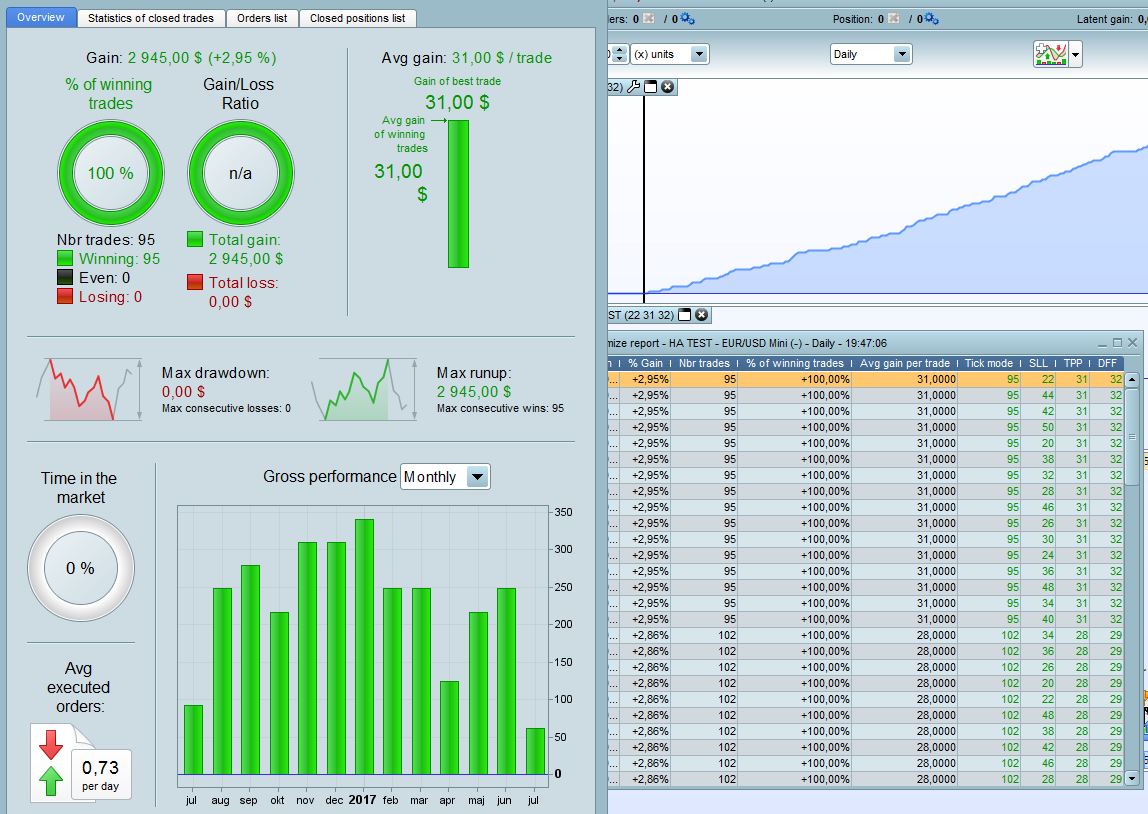
Tick by tick is marked, and I’m going to optimizing some variables, but I get the same results in the Detailed Report as the Optimize Report. Normally, when clicking a row the tick by tick test is done – right? And this code has many inside candles.
So either way, something is weird with this back-test, or I found the perfect code!
Thanks!
T
Sorry, the question is not obvious in the code, but I’m of course wondering how to fix this in order to perform tick by tick backtest while optimizing.
Thanks!
T
Getting tired now – “not obvious in the post” I mean…
naja without code or parts of the code is difficult to understand, you had the coden already on a demo account pushed some time run?
If you click in a row, you have to make once again a backtest with the found variables, with no optimisation, in tick-by-tick mode. Otherwise, you’ll have get the “old” version of the backtest (without inside bars checking).
Exactly – but this time nothing happened when I clicked the rows. I got the same values in the Detailed Report as in the Optimize Report, as you can see in the picture. The tick-by-tick is done automatically when clicking the rows, right? I don’t have to do anything else?
I don’t think so. Just to be sure, uncheck optimization variables and make them fixed ones and launched again the backtest with tick mode enable.
I have tried that. Then I get completly different result, even though using the same values as the row in the Optimize Report. So it must be that it won’t use the tick-by-tick when optimizing, dispite marking the rows.
Ever heard of this issue before?
The optimizer don’t use tick-by-tick, even if the option is checked. That’s why there is a column named “Tick mode” that telling you how much bars are considered to be a ‘problem’ to the current backtest engine because of the famous “zero bar issue”.
So with the optimisation reports, pick the strategy you are feeling enough good and then launch new backtests, one by one, this time with no optimisation (with fixed values). Hope I’m clear now 🙂
Yes, that I know.
But let me try again. On other optimizations, the tick-by-tick backtest was performed for each combination of optimized values by clicking on the rows. Then I get another result in the Detailed Report than in the Optimize Report, using the same values due to the tick-by-tick backtest.
This time, the results of the backtest was the same in the Detailed Report as in the Optimize Report, even though clicking the rows. The backtest is not performed tick-by-tick by clicking the rows, like before. Which is also verified by using the same combination of values without optimizing (then is tick-by-tick performed).
So, to conclude – I was hoping to be able to perform the tick-by-tick backtest by clicking the rows – like always before – instead of exiting and changing manually. I have not seen this “problem” before and hope there might be a solution.
Sorry for repeating this – appreciate your help!
Nicolas, do you understand my question and have an answer?
Thanks!
Sorry for late answer, been quite busy recently 🙁
I think that you are lead into error because of the 0 zero bar phenomena that might happen during optimisations. Some strategies have none, or some have a lot and that’s why clicking on a row might change a lot the results of the backtest:
If a strategy has no more than (for instance) 1 or 2% of its trade during only 1 bar: the result between no tick-by-tick or tick backtests would certainly be the same, or with such a small difference that you will not perceive it, so IMO that’s why you think the backtester has a different behavior now than before.
You seem to be completely correct in this. In my case there are no tick-by-tick test performed when clicking on a single row in the optimization window (even though tick-by-tick is selected). The only way to get a tick-by-tick test to be performed seem to be to transfer all the optimized values to fixed values.
For my current strategy this makes it just 1/4 as profitable as when just clicking on a single row in the optimization window. I find this quite disturbing as it makes the optimization quite much harder to perform. IT-finance should really put down some more efforts on documentation as I can’t find this behavior documented anywhere.
Anyone has some better idea of how to optimize tick-by-tick the easiest way?
It would be so much easier if you put your code on here then we can do same as you with your code but on our Platform and report back with our results / findings.
Only time I’ve got same result when clicking a row is if there were a zero / 1 or 2 in the tick mode column (as Nicolas said).
Cheers
GraHal
OK, here comes the code. It’s basicly the short part of the ALE tradings system “Smoothed Bollinger”, https://www.prorealcode.com/prorealtime-trading-strategies/smoothed-bollinger-strategy-daily/, with some small modifications. The optimization values are those behind comment marks.
The optimization is done on USDJPY mini. Tested this morning with the same result – no tick by tick is performed until you set the values as constants.
The strange thing is that I tested an completely different system and optimized that one too. I that case it worked as it should – tick by tick were performed when clicking on the different optimization window rows.
DEFPARAM preloadbars = 400
DEFPARAM CumulateOrders =  FALSE
ONCE avgEnterEnabled      = 1    //Moving Average Entry Filter - 0 OFF, 1 ON
ONCE trailingStopType     = 1    // Trailing Stop - 0 OFF, 1 ON
//ONCE takeprofit           = 6   // Take Profit %
//ONCE stoploss             = 8    // Stop Loss %
//ONCE trailingstopshort    = 3    // Trailing Stop Atr Relative Distance
//ONCE barshort             = 2    // Exit Time Short
//ONCE atrtrailingperiod    = 200  // Atr parameter Value
ONCE minstop              = 2    // Minimum Trailing Stop Distance

// MOVING AVERAGE - Parameter
//ONCE avgDiffPeriod = 300
//ONCE minDiffAvg = 0.003
//ONCE avgLongPeriod          = 120
// Smoothed Bollinger %b indicator - Parameters
//ONCE period                 = 14
//ONCE TeAv                   = 6
//ONCE SveEnterShortThreshold = 80

// TRAILINGSTOP
//----------------------------------------------
//atrtrail = AverageTrueRange[atrtrailingperiod]((close/10)*pipsize)/1000  // för index
atrtrail = AverageTrueRange[atrtrailingperiod]((close/10)*pipsize) // för forex
trailingstartS = round(atrtrail*trailingstopshort)
if trailingStopType = 1 THEN
TGS=trailingstarts
if not onmarket then
MINPRICE = close
PREZZOUSCITA = 0 // = utgångspris
ENDIF
if shortonmarket then
MINPRICE = MIN(MINPRICE,close)
if tradeprice(1)-MINPRICE>=TGS*pointsize then
if tradeprice(1)-MINPRICE>=MINSTOP then
PREZZOUSCITA = MINPRICE+TGS*pointsize
ELSE
PREZZOUSCITA = MINPRICE + MINSTOP*pointsize
ENDIF
ENDIF
ENDIF
if onmarket and PREZZOUSCITA>0 then
EXITSHORT AT PREZZOUSCITA STOP
ENDIF
ENDIF
//--------------------------------------------------------------------------------------------------
// FILTER SETTINGS
//--------------------------------------------------------------------------------------------------
//MOVING AVERAGE
longAvg = Average[avgLongPeriod] (close)
diffAvg = Average[avgDiffPeriod] (close)
//avgFilterEnterShort = (close<longAvg OR NOT avgEnterEnabled)
avgFilterEnterShort = ((close<longAvg AND (diffAvg[1]-diffAvg)>minDiffAvg) OR NOT avgEnterEnabled)

//Smoothed Bollinger %b indicator
haOpen = ((Open[1]+High[1]+Low[1]+Close[1])/4 + (Open[2]+High[2]+Low[2]+Close[2]))/2
haC = ((Open+High+Low+Close)/4 + haOpen + Max(high,haOpen) + Min(low,haOpen)) /4
TMA1 = tema[TeAv](haC)
TMA2 = tema[TeAv](TMA1)
Diff = TMA1-TMA2
ZlHA = TMA1+Diff
percb = (tema[TeAv](ZLHA)+2*STD[period](tema[TeAv](ZLHA))-weightedaverage[period](tema[TeAv](ZLHA))) / (4*STD[period](tema[TeAv](ZLHA)))*100
SveFilterEnterShort = (percb > SveEnterShortThreshold )

// STRATEGY
//--------------------------------------------------------------------------------------------------


IF NOT ShortOnMarket AND avgFilterEnterShort AND SveFilterEnterShort THEN
SELLSHORT 1 CONTRACT AT MARKET
ENDIF


IF POSITIONPERF<0 THEN
IF shortOnMarket AND BARINDEX-TRADEINDEX(1)>= barshort  THEN
EXITSHORT AT MARKET
ENDIF
ENDIF

SET STOP %LOSS stoploss
SET TARGET %PROFIT Takeprofit