


trouver un range grâce à l'indicateur ichimoku

Viewing 10 posts - 1 through 10 (of 10 total)

  • Author
    Posts
  • #61446 quote
    primo1
    Participant
    Average

    Bonjour,

    j’essaie de créer un indicateur permettant de détecter les range avec ichimoku seulement il me met erreur de syntaxe.

    L’idée générale est d’avoir plusieurs twist sur une periode 120 barres sur 2 h

    En vous remerciant pour votre contribution

    TWIST = 0
    range = 0
    hautdurange=0
    basdurange=0
    SSpanA=(tenkansen[26]+kijunsen[26])/2
    SSpanB=(highest[52](high[26])+lowest[52](low[26]))/2
    // CROISEMENT SSA > SSB
    IF SSpanA[1] < SSpanB[1] and SSpanA > SSpanB THEN
    TWIST = 1
    ENDIF
    
    // CROISEMENT SSA < SSB
    IF SSpanA[1] > SSpanB[1] and SSpanA < SSpanB THEN
    TWIST = -1
    ENDIF
    if barindex [120]twist =1 or twist =-1 THEN
    range =1
    endif
    
    if [highest[120]-SSpanA]-[LOWEST[120]-SSpanB]=0 then
    hautdurange=highest
    endif
    elsif hautdurange=0
    if [highest[120]-SSpanA]-[LOWEST[120]-SSpanB]=0 then
    basdurange=lowest
    endif
    #61565 quote
    Nicolas
    Keymaster
    Master

    En effet, tu utilises un nom de variable réservé au langage à la ligne 17. “range” est une instruction ProBuilder, par conséquent tu dois trouver un autre nom pour ta variable, comme “toto” par exemple 🙂

    EDIT: je vois de nombreuses autres erreurs dans le code, notamment dans l’utilisation de HIGHEST et LOWEST.

    primo1 thanked this post
    #62198 quote
    primo1
    Participant
    Average

    Bonjour à tous


    je cale ,j’ai modifié l indicateur mais je m’en sors pas


    De l’aide

    TWIST = 0
    zonedefinie = 0
    hautdurange=0
    basdurange=0
    SSpanA=(tenkansen[26]+kijunsen[26])/2
    SSpanB=(highest[52](high[26])+lowest[52](low[26]))/2
    // CROISEMENT SSA > SSB
    IF SSpanA[1] < SSpanB[1] and SSpanA > SSpanB THEN
    TWIST = 1
    ENDIF
     
    // CROISEMENT SSA < SSB
    IF SSpanA[1] > SSpanB[1] and SSpanA < SSpanB THEN
    TWIST = -1
    ENDIF
    if barindex [120] TWIST =1  THEN
    
    zonedefinie=1
    
    ELSE
     zonedefinie=0
    
    endif
    if((High>Highest[120](close)-SSpanA)-(low<lowest[120](close)-SSPANB)=0
    hautdurange = High
    ELSE
    hautdurange = Highest[120](close)
    ENDIF
     if(((High>Highest[120](close)-SSpanA)+(low<lowest[120](close)-SSPANB)=0
    badurange= low
    else
    basurange=lowest[120](close)
    endif
    
     screener basdurange]
    #62214 quote
    primo1
    Participant
    Average

    Bonjour, j’essaie de créer un indicateur permettant de détecter les range avec ichimoku seulement il me met erreur de syntaxe. L’idée générale est d’avoir plusieurs twist sur une periode 120 barres sur 2 h En vous remerciant pour votre contribution

    #62236 quote
    primo1
    Participant
    Average
    TWIST = 0
    zonerange=0
    hautdurange=0
    basdurange=0
    SSpanA=(tenkansen[26]+kijunsen[26])/2
    SSpanB=(highest[52](high[26])+lowest[52](low[26]))/2
    // CROISEMENT SSA > SSB
    IF SSpanA[1] < SSpanB[1] and SSpanA > SSpanB THEN
    TWIST = 1
    ENDIF
    // CROISEMENT SSA < SSB
    IF SSpanA[1] > SSpanB[1] and SSpanA < SSpanB THEN
    TWIST = -1
    ENDIF
    
    if barindex [120] twist=1 or barindex[120] twist =-1 THEN
    zonerange =1
    
    endif
    if [highest[120]-SSpanA]-[LOWEST[120]-SSpanB]=0 then
    hautdurange=highest
    endif
    elsif hautdurange=0
    if [highest[120]-SSpanA]-[LOWEST[120]-SSpanB]=0 then
    basdurange=lowest
    endif
    elsif basdurange=0


    return zonerange
    

    Bonjour,


    j’ai essayé d apporter des modifications.


    mais problème dans le code

    #62433 quote
    Nicolas
    Keymaster
    Master

    Il y a une mauvaise utilisation du langage à la ligne 16, je ne comprends pas bien ce que tu veux faire avec cette ligne ? en Français littéral ça donnerait quoi ? Afin que je puisse t’aider à la programmer 🙂

    primo1 thanked this post
    #62438 quote
    primo1
    Participant
    Average

    Tout d’abord ,


    merci de tenter de m’ aider

    je m’explique si dans un laps de temps de 2 heures l a sspan a  croise plusieurs fois la sspan b et inversement  alors il se produit à chaque croisement des twists.

    l’idee est de quantifier ces croisements et de caractériser la limite du range

    #62796 quote
    primo1
    Participant
    Average

    Bonjour Nicolas


    T a pas une idée pour créer un indicateur qui pourrait nous permettre de trouver un range avec ses limites hautes et basse.


    En te remerciant

    #62882 quote
    Nicolas
    Keymaster
    Master

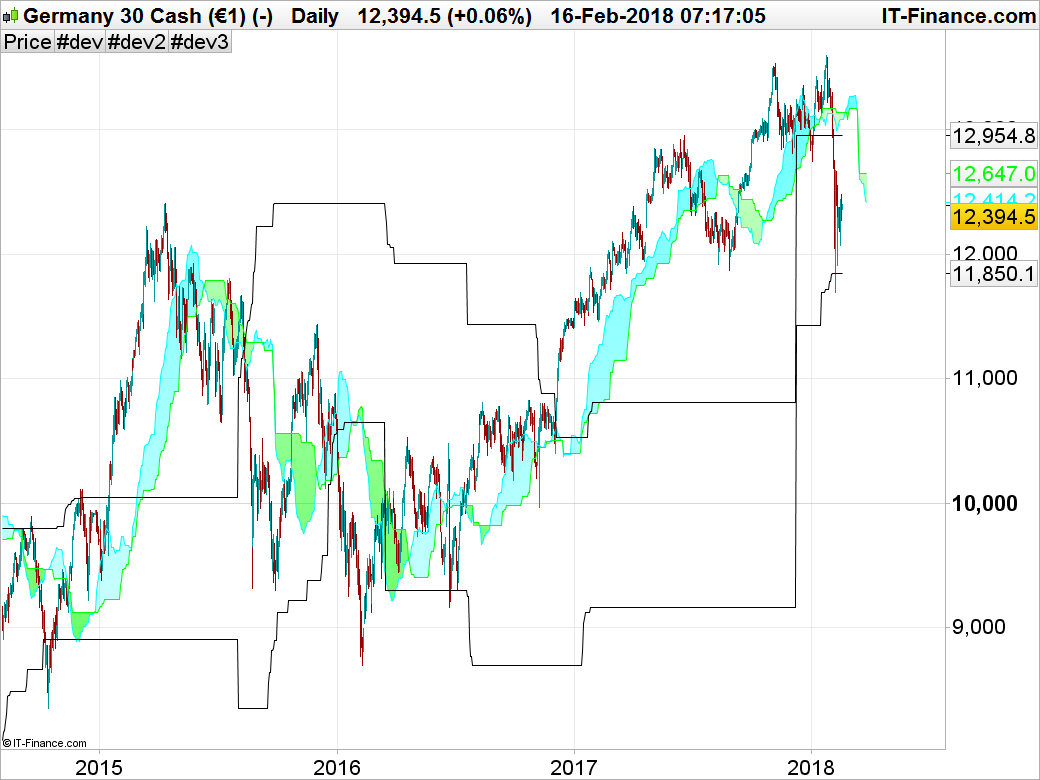
    Voilà ce que j’ai codé rapidement d’après cette idée. Si on a eu au moins 3 croisements du nuage sur les 120 dernières périodes, alors la valeur du range supérieur et inférieur est égal au plus haut/ plus bas d’il y a 120 barres.

    //--- ichimoku parameters
    p1=9
    p2=26
    p3=52
    
    tenkan=(highest[p1](high)+lowest[p1](low))/2
    kijun=(highest[p2](high)+lowest[p2](low))/2
    SSpanA=(tenkan+kijun)/2
    SSpanB=(highest[p3](high)+lowest[p3](low))/2
    
    // CROISEMENT SSA > SSB
    IF SSpanA crosses over SSpanB THEN
    TWIST = 1
    Elsif SSpanA crosses under SSpanB THEN
    TWIST = -1
    else 
    twist = 0
    ENDIF
    
    if summation[120](twist=1 or twist=-1)>=3 THEN
    zonerange = 1 
    else 
    zonerange = 0
    endif
    
    if zonerange = 1 then 
    hh=highest[120](high)[120]
    ll=lowest[120](low)[120]
    endif
    
    return hh,ll, summation[120](twist=1 or twist=-1)
    primo1 thanked this post
    #62952 quote
    primo1
    Participant
    Average

    Bonjour,


    Super ce code je ne comprends pas cette ligne de code :if summation[120](twist=1 or twist=1)>=3 pourquoi >3


    si tu peux m’éclairer

    bien amicalement

Viewing 10 posts - 1 through 10 (of 10 total)
  • You must be logged in to reply to this topic.

trouver un range grâce à l'indicateur ichimoku


Support ProBuilder

New Reply
Author
author-avatar
primo1 @primo1 Participant
Summary

This topic contains 9 replies,
has 2 voices, and was last updated by primo1

7 years, 11 months ago.

Topic Details
Forum: Support ProBuilder
Language: French
Started: 02/04/2018
Status: Active
Attachments: 1 files
Logo Logo
Loading...

