Schaff Trend with CCI

Viewing 3 posts - 1 through 3 (of 3 total)
  • Author
    Posts
  • #87131 quote
    Loop
    Participant
    Senior

    Indicator found in Tradingview website:

    https://www.tradingview.com/script/SYXp2cAq-CCI-Cycle-Modified-Schaff-Trend-Cycle/

    Code:

    //@version=3

    study(title=”CCI Cycle”, shorttitle=”CCI Cycle”, overlay=false)

    // ——————————- Inputs ——————————- //
    src = input(close, title=”Source”)
    length=input(10)
    useCurrentRes = input(true, title=”Use Current Chart Resolution?”)
    resCustom = input(“240″, title=”Use Different Timeframe? Uncheck Box Above”)

    res = useCurrentRes ? period : resCustom

    // ——————————- CCI ——————————- //
    ma = sma(src, length)
    cci = (src – ma) / (0.015 * dev(src, length))
    ccis = security(tickerid, res, rma(2*ema(cci, length/2)-ema(cci, length), round(sqrt(length))))

    // ——————————- Cycle ——————————- //
    ccic(length) =>
    factor=input(0.5)
    m = ccis
    v1 = lowest(m, length)
    v2 = highest(m, length) – v1
    f1 = 0.0
    f1 := (v2 > 0 ? ((m – v1) / v2) * 100 : nz(f1[1]))
    pf = 0.0
    pf := (na(pf[1]) ? f1 : pf[1] + (factor * (f1 – pf[1])))
    v3 = lowest(pf, length)
    v4 = highest(pf, length) – v3
    f2 = 0.0
    f2 := (v4 > 0 ? ((pf – v3) / v4) * 100 : nz(f2[1]))
    pff = 0.0
    pff := (na(pff[1]) ? f2 : pff[1] + (factor * (f2 – pff[1])))
    pff

    CCIC = security(tickerid, res, ccic(length))

    // ——————————- Plotting ——————————- //

    plot(CCIC,color=red, title=”CCI Cycle”)
    ul=plot(25)
    ll=plot(75)
    fill(ul,ll,color=red)


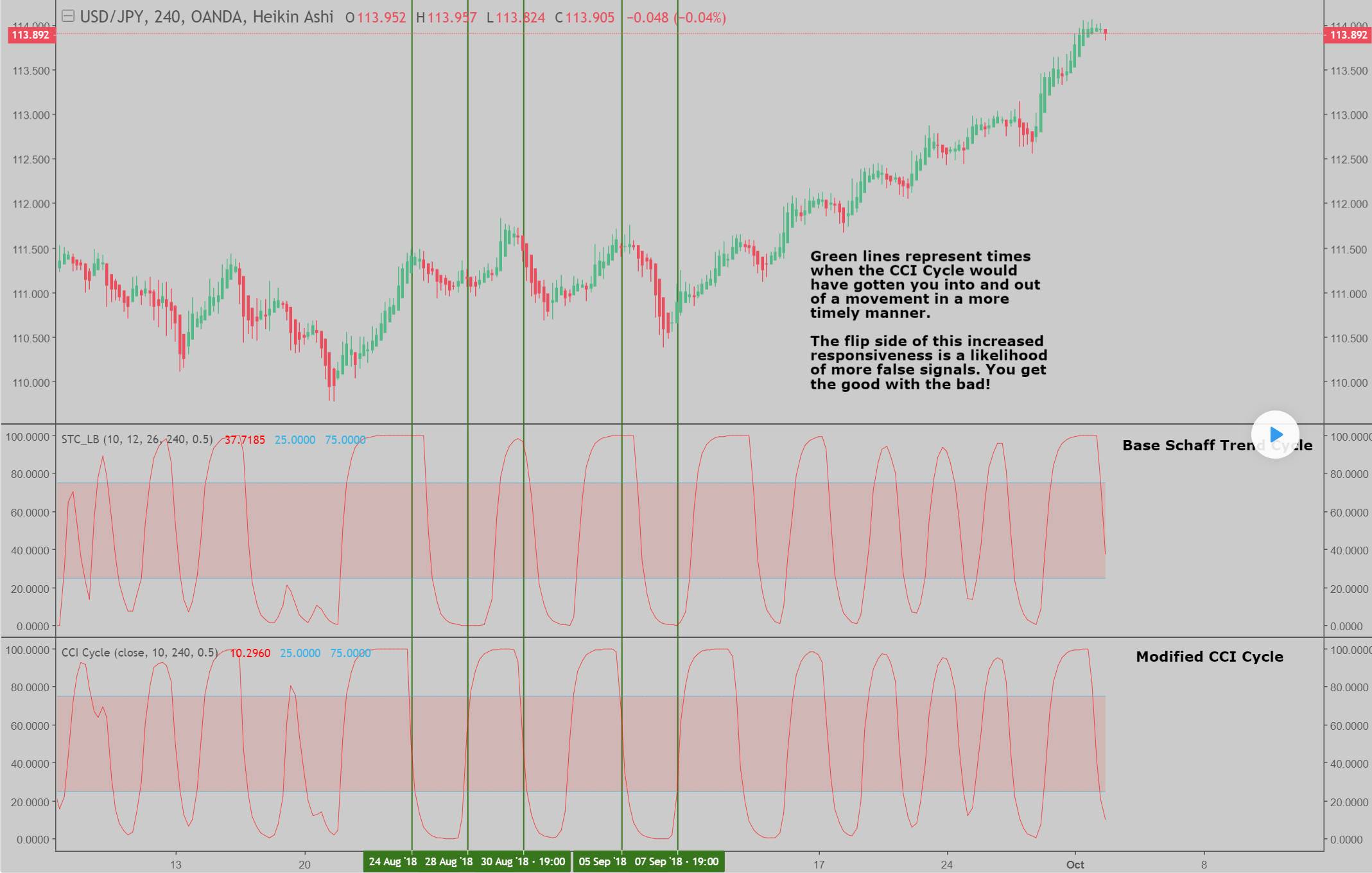
    It should be very similar to Schaff indicator but with earlier signals.

    If you go at the abocìve reported web link you can also find how it look like!


    Thanks a lot in advance

    schaff-trend-cycle-cci.jpg schaff-trend-cycle-cci.jpg
    #87283 quote
    Nicolas
    Keymaster
    Legend

    I changed the code found here: Schaff Trend Cycle

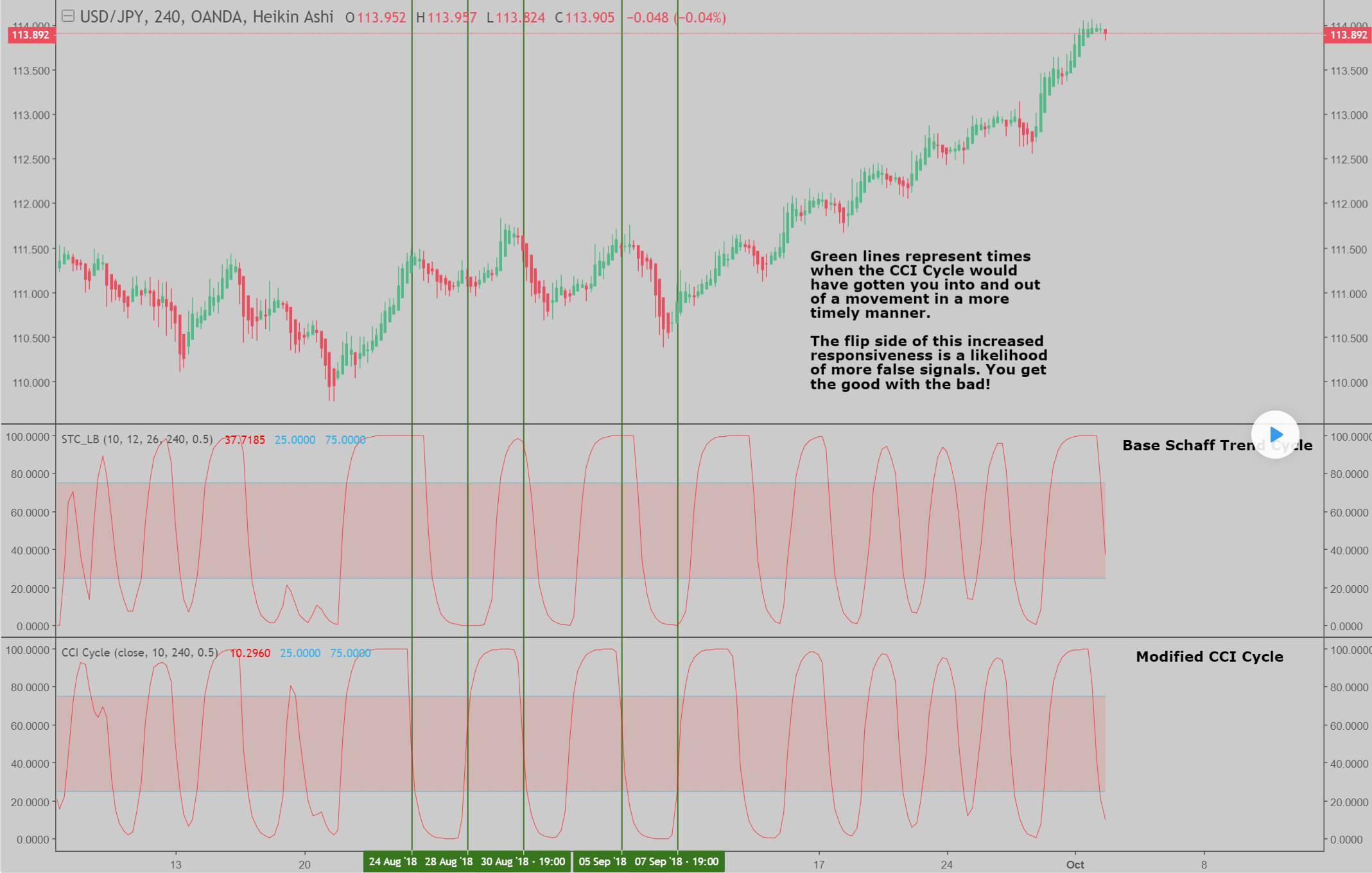
    to made the calculation with a CCI instead of a MACD, here it is:

    //input parameters
    TCLen = 10
    
    Once Factor = 0.5
    
    if barindex>TCLen then
    icci = cci[TCLen]
    //{1st Stochastic: Calculate Stochastic of a CCI}
    Value1 = Lowest[TCLen](icci)
    Value2 = Highest[TCLen](icci) - Value1
    
    //{%Fast K of MACD}
    if Value2 > 0 then
    Frac1 = ((icci - Value1)/Value2) * 100
    else
    Frac1 = Frac1[1]
    endif
    
    //{Smoothed Calculation for % Fast D of CCI}
    PF = PF[1] + (Factor * (Frac1 - PF[1]))
    
    //{2nd Stochastic: DCalculate Stochastic of smoothed Percent Fast D, 'PF', above}
    Value3 = Lowest[TCLen](PF)
    Value4 = Highest[TCLen](PF) - Value3
    
    //{% of Fast K of PF}
    if Value4 > 0 then
    Frac2 = ((PF - Value3)/Value4) * 100
    else
    Frac2 = Frac2[1]
    endif
    
    //{Smoothed Calculation for %Fast D of PF}
    PFF = PFF[1] + (Factor * (Frac2 - PFF[1]))
    endif
    
    RETURN PFF, 75 coloured(0,0,255) as "level 75", 25 coloured(0,0,255) as "level 25"


    Please next time use the correct form and rules, to ask for a code conversion: Ask for a free code conversion

    denmar thanked this post
    schaff-trend-cycle-cci-1.jpg schaff-trend-cycle-cci-1.jpg
    #87413 quote
    Loop
    Participant
    Senior

    Thanks Nicolas for your valuable help!

Viewing 3 posts - 1 through 3 (of 3 total)

  • You must be logged in to reply to this topic.

ProRealAI ProRealAI New

Stuck on this ProBuilder code?

Describe what this topic is trying to build, in plain English, and ProRealAI writes the ProRealTime™ indicator, screener or system for you.

Available in 7 languages
Try ProRealAI

Schaff Trend with CCI


ProBuilder: Indicators & Custom Tools

New Reply
Author
author-avatar
Loop @loop Participant
Summary

This topic contains 2 replies,
has 2 voices, and was last updated by Loop

7 years, 9 months ago.

Topic Details
Forum: ProBuilder: Indicators & Custom Tools
Language: English
Started: 12/14/2018
Status: Active
Attachments: 2 files
Logo Logo
Loading...